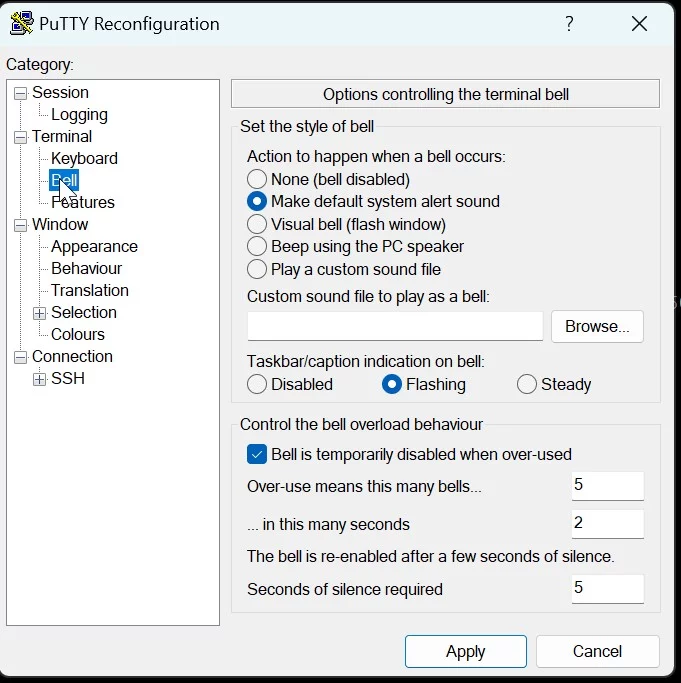
Typically I like to not start adop (or other long running processes) directly but I use a "screen" (https://www.gnu.org/software/screen/) session to start the process. In that way should my internet or VPN connection break down the process continues and I can reattach to the session.
Unfortunately screen does some "special" handling of the "bell" event which in the original configuration I found in my "jump host" from where I connect to the E-Business Suite environments screwed the putty notification of the bell event. To fix this I created a ~/.screenrc file as follows:
[opc@ebscm2 ~]$ cat .screenrc
bell_msg "Bell in window %n ^G"
vbell off
The first command sets the bell_msg to both contain a visual hint in which of potential multiple (background) windows of you screen session a bell event happened. The final ^G makes sure that another "bell" event is raised through that notification. With this setting you make sure that a background bell is actually passed on to PuTTY.
The second setting controls the foreground screen session. By disabling the visual bell (flashing of screen window) a regular bell is passed to the terminal.
The combination of those settings allow bell signals to be propagated to the PuTTY terminal both in foreground and background screen windows. Before continuing, it is a good idea to test both with the above mentioned echo command.