
Broadpin

The Missing Manual: Downloading Oracle Patches from the Command Line (replacing the lost wget.sh)

This blog post was written by Johannes Michler (Chief Technology Officer (CTO) @ Broadpin & Oracle Ace Director). It was originally published on 22 January 2026 by PROMATIS, which is now Broadpin.

If you are an Oracle DBA or System Administrator, you probably remember the "good old days." You'd find a patch on My Oracle Support (MOS), click a button that said "Wget Options," and Oracle would generate a handy, pre-authenticated wget.sh script for you. You’d copy it to your server, run it, and walk away.

Then, one day, that button disappeared.

Now, trying to download a 5GB patch directly to a headless Linux server in a DMZ is a frustrating exercise. You can't just wget the download link because of Oracle’s Single Sign-On (SSO) mechanism. If you try, you end up downloading an HTML login page instead of the zip file.

This usually means downloading the patch to your laptop over VPN, then slowly SCP-ing it to the target server. It’s tedious and inefficient.
The Solution: Authenticated Wget

The secret to automated MOS downloads is handling the SSO "cookie dance." You need a script that first authenticates with your credentials, saves the resulting session cookie to a temporary file, and then presents that cookie when requesting the actual patch file.

Below is a robust Bash script designed to replace the functionality of the old official Oracle script. It streamlines the process by making it interactive and smart about filenames.

Key Features of This Script

Unlike generic wget commands you might find on forums, this script has been tailored for usability:

  1. Smart Default Username: If you frequently use the same MOS account (e.g., a team account), you can press Enter at the prompt to use a hardcoded default.

  2. Handles Messy URLs: Oracle download links are long and ugly. They look like this: https://updates.oracle.com/.../download/p35583866_R12_GENERIC.zip?aru=25306031&patch_file=p35583866_R12_GENERIC.zip. You don't have to parse this. Just copy the whole link from your browser and paste it into the script.

  3. Automatic Filename Extraction: This is the best part. If you just wget that long URL, you might end up with a file named index.html?aru=2530.... This script intelligently parses the URL to find the actual patch_file= parameter (e.g., p35583866_R12_GENERIC.zip) and saves the download with the correct name.

  4. Secure Credentials: It never takes password as a command-line argument. It uses wget --ask-password to ensure your credentials aren't saved in shell history files like .bash_history.

The Script

Copy the code below and save it to your server, for example as mos_download.sh.

(Note: You may want to edit the x.y@web.de default username near line 9 before saving).

#!/bin/sh

LANG=C
export LANG

# Trap to cleanup cookie file in case of unexpected exits.
trap 'rm -f $COOKIE_FILE; exit 1' 1 2 3 6

DEFAULT_SSO_USERNAME="x.y@web.de"
# 1. SSO username modification: Default DEFAULT_SSO_USERNAME if empty
printf 'SSO UserName [Press Enter for '$DEFAULT_SSO_USERNAME']: '
read SSO_USERNAME

if [ -z "$SSO_USERNAME" ]; then
SSO_USERNAME=$DEFAULT_SSO_USERNAME
echo "Using default username: $SSO_USERNAME"
fi

# 2. Ask for the URL
printf 'Download URL: '
read DOWNLOAD_URL

# Basic validation to ensure URL is not empty
if [ -z "$DOWNLOAD_URL" ]; then
echo "Error: URL is required."
exit 1
fi

# 3. Extract the filename from the patch_file parameter
# This sed command looks for 'patch_file=', matches everything that isn't an '&' afterwards, and prints it.
FILENAME=$(echo "$DOWNLOAD_URL" | sed -n 's/.*patch_file=\([^&]*\).*/\1/p')

# Check if filename was extracted successfully
if [ -z "$FILENAME" ]; then
echo "Error: Could not extract filename. Ensure URL contains parameter 'patch_file=name.zip'"
exit 1
fi

echo "Target filename: $FILENAME"

# Path to wget command
WGET=/usr/bin/wget

# Location of cookie file
COOKIE_FILE=$(mktemp -t wget_sh_XXXXXX) >> /dev/null 2>&1
if [ $? -ne 0 ] || [ -z "$COOKIE_FILE" ]
then
echo "Temporary cookie file creation failed."
exit 1
fi
echo "Created temporary cookie file $COOKIE_FILE"

# Output directory and file
OUTPUT_DIR=.

#
# End of user configurable variable
#

# The following command to authenticate uses HTTPS. This will work only if the wget in the environment
# where this script will be executed was compiled with OpenSSL.
echo "Starting wget; enter password for Oracle Support:"
$WGET --secure-protocol=auto --save-cookies="$COOKIE_FILE" --keep-session-cookies --http-user "$SSO_USERNAME" --ask-password "https://updates.oracle.com/Orion/Services/download" -O /dev/null

# Verify if authentication is successful
if [ $? -ne 0 ]
then
echo "Authentication failed with the given credentials."
else
echo "Authentication is successful. Proceeding with downloads..."

# Modified download command using dynamic URL and Filename
$WGET --load-cookies="$COOKIE_FILE" "$DOWNLOAD_URL" -O "$OUTPUT_DIR/$FILENAME"

fi

# Cleanup
rm -f "$COOKIE_FILE"

How to Use It

  1. Save the script above to your Linux server (e.g., mos_download.sh).

  2. Make it executable: chmod +x mos_download.sh

  3. In your web browser on MOS, find the patch you need. Right-click the download button and select "Copy Link Address."

  4. Run the script on your server.

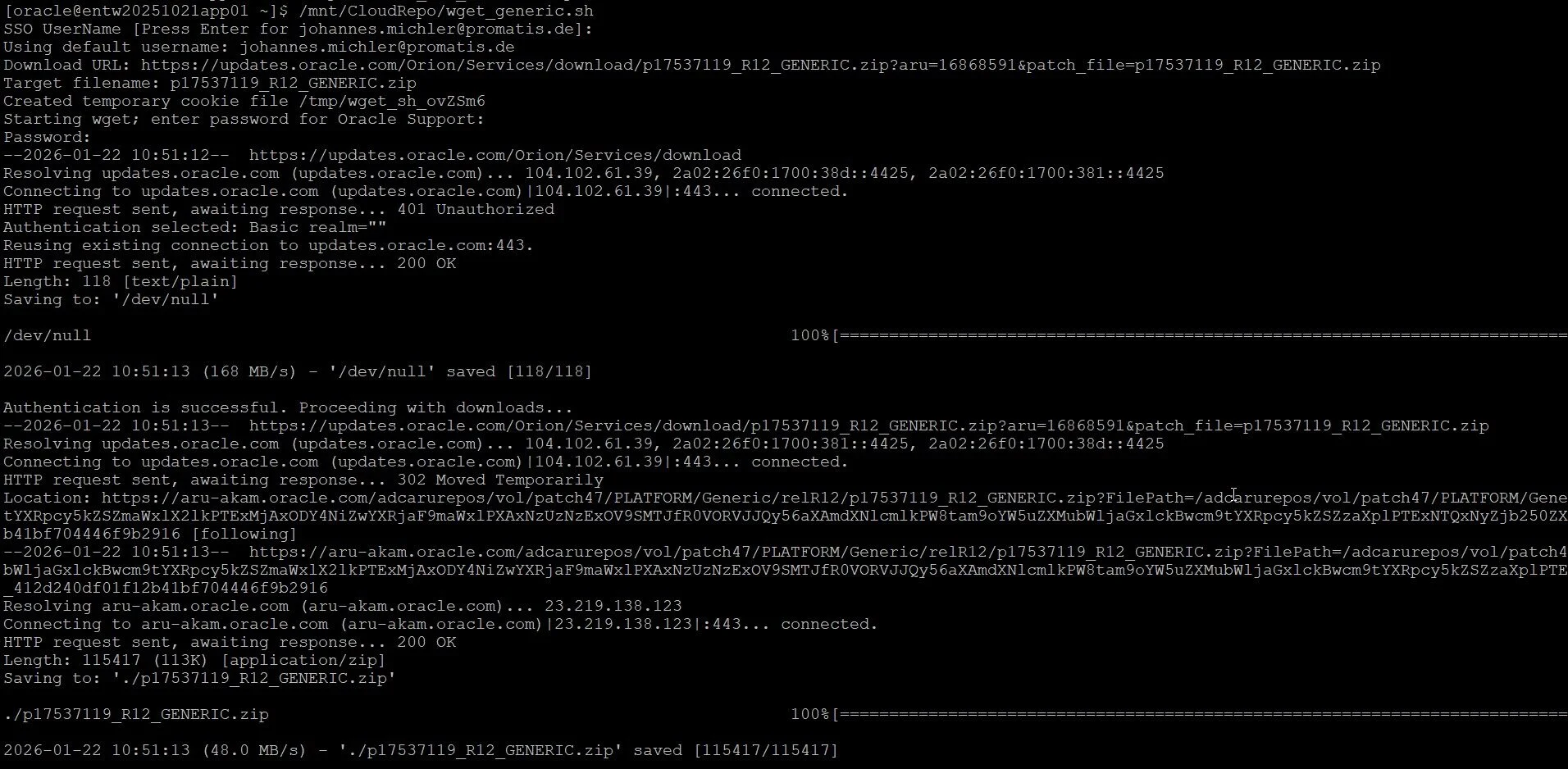
Here is an example run:

Output of the download script

Note: The 401 Unauthorized can be savely ignored.

The patch is now sitting on your server, ready to be unzipped, saving you the hassle of the laptop-hop.