
Broadpin

SOA Suite on Docker, Part 4: The Compose File, and the Production Gotchas Behind It

This blog post was written by Johannes Michler (Chief Technology Officer (CTO) @ Broadpin & Oracle Ace Director).

This is the last part of the series. Part 1 covered the certified, containerized 14.1.2 platform, Part 2 the side-by-side migration off 12c, and Part 3 how we build and patch the image. What is left is the thing that actually runs the environment day to day: the Docker Compose file, and the handful of details we had to get right to make it production-grade.

I covered the general idea of using Docker Compose for SOA Suite in an earlier post. If you want the background on podman-compose on Oracle Linux, Oracle has a good walkthrough. Here I want to focus on what is specific to a real deployment. This is the compose file for one environment (our development environment, "entw"):

services:
  adminserver:
    image: xxis_soa14:latest
    ports:
      - '10.22.17.142:7001:7001'
    environment:
      CONNECTION_STRING: soacloudtestdb.intern.dns:1521/SOATESTPDB1
      RCUPREFIX: SOADOCENTW
      DB_PASSWORD: topSecret4321
      DB_SCHEMA_PASSWORD: topSecret1234
      ADMIN_PASSWORD: moreSecret5432
      DOMAIN_NAME: soaentw
      DOMAIN_TYPE: soa
      ADMIN_HOST: soadockerentw.intern.dns
      ADMIN_PORT: '7001'
      PERSISTENCE_STORE: file
    volumes:
      - userprojects:/u01/oracle/user_projects
      - /home/opc/soa-ops/entw/setUserOverridesLate.sh:/u01/oracle/user_projects/domains/soaentw/bin/setUserOverridesLate.sh
      - /home/opc/soa-ops/entw/createDomain.py:/u01/oracle/container-scripts/createDomain.py
    networks:
      - soa_net
  soamanagedserver1:
    image: xxis_soa14:latest
    command: /u01/oracle/container-scripts/startMS.sh
    ports:
      - '10.22.17.142:7003:7003'
    environment:
      MANAGED_SERVER: soa_server1
      DOMAIN_NAME: soaentw
      ADMIN_HOST: soadockerentw.intern.dns
      ADMIN_PORT: '7001'
      ADMIN_PASSWORD: moreSecret5432
      MANAGED_SERVER_CONTAINER: 'true'
      MANAGEDSERVER_PORT: '7003'
    volumes:
      - userprojects:/u01/oracle/user_projects
      - /home/opc/sap_gp_xml_ENTW:/mnt/sap_gp_xml
      - /home/opc/soa-ops/entw/setUserOverridesLate.sh:/u01/oracle/user_projects/domains/soaentw/bin/setUserOverridesLate.sh
      - /home/opc/zugferd:/home/oracle/zugferd
    depends_on:
      adminserver:
        condition: service_healthy
    networks:
      - soa_net
  ohs1:
    image: container-registry.oracle.com/middleware/ohs_cpu:14.1.2.0-jdk21-ol9
    ports:
      - '10.22.17.142:7777:7777'
    volumes:
      - /home/opc/soa-ops/entw/ohs_boot:/u01/oracle/bootdir
      - /home/opc/soa-ops/entw/ohs_conf:/config
    depends_on:
      adminserver:
        condition: service_healthy
    networks:
      - soa_net
networks:
  soa_net:
    driver: bridge
volumes:
  userprojects:

The passwords here are placeholders. In a real deployment you would inject them through an env file or a secrets mechanism rather than writing them inline. The admin server and the managed server share the domain home through the userprojects named volume, the managed server gets a couple of host directories mounted for file-based integrations (a SAP XML drop folder and a ZUGFeRD directory for e-invoicing), and depends_on ... service_healthy makes sure the managed server and OHS only start once the admin server is actually up. Most of that is unremarkable. The interesting parts are four things we had to solve.
SOA Suite on Docker, Part 3: Building a Patched Image, and Reacting to CPUs in Minutes

1. Two environments on one host: a dedicated IP each

As I mentioned in Part 1, development and test share a single host to keep the licensing footprint small, since 2 OCPUs map to one Oracle processor license and that is plenty for most dev and test work. Running two complete SOA environments on one machine takes a little care, because both want the same ports (7001, 7003, 7777).

The fix is to give the host two IP addresses, one per environment, and bind each environment's published ports to its own IP rather than to all interfaces:

 ports:
      - '10.22.17.142:7001:7001'

The test environment publishes the same ports on its own IP, so the two never collide. That binding is the part that matters. Each environment also has its own admin hostname (soadockerentw.intern.dns), which just needs to resolve to that environment's IP, and a normal DNS entry handles that. Early on, before that DNS record existed, we forced the mapping with an extra_hosts entry in each container. Once the DNS entry was in place it became unnecessary, which is why you will not find it in the file above.

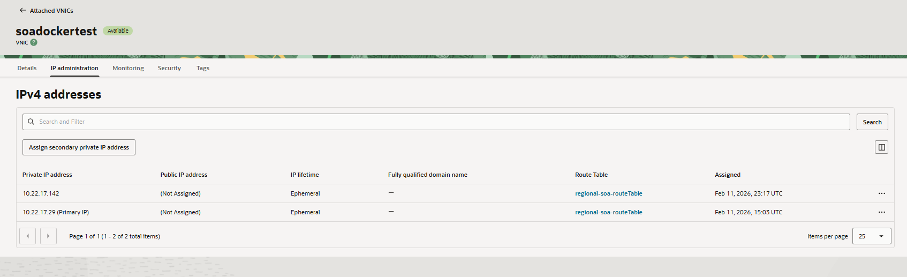
Getting that second IP onto the host is a two-step job. First, in the OCI console, on the instance's VNIC under IP administration, click Assign secondary private IP address and keep the defaults. That gives the VNIC a second private IP alongside its primary one.

Assigning secondary IP in OCI Console

OCI assigns the address at the VNIC level, but the operating system does not bring it up automatically, so we add it to the interface at boot. Append this to the end of /etc/rc.d/rc.local:

ip addr add 10.22.17.142/24 dev enp0s5 label enp0s5:0

and make sure the file is executable:

sudo chmod +x /etc/rc.d/rc.local

With that in place the host comes up with both IPs, and each environment's compose file binds to its own.

The result is two full three-container stacks living side by side on one host, each reachable on its own IP, each internally consistent. The test environment is the same file with the test IP, hostname, and schema.

2. Late JVM overrides: setUserOverridesLate.sh

WebLogic sources setUserOverridesLate.sh near the very end of server startup, after the standard environment scripts have run, which makes it the right place to force JVM settings that have to win. We keep ours in the soa-ops repository and mount it into the domain's bin directory, so the tuning is version-controlled and external to the image and the domain. Ours looks like this:

echo "initial value in lateUserOverride script: $EXTRA_JAVA_PROPERTIES"

# After applying a CPU, SSL verification no longer honored the Java keystore.
# Strip the DemoTrust.jks and point the trust store at the JDK cacerts.
# (internal reference SR 3-35704849071)
EXTRA_JAVA_PROPERTIES=$(echo "$EXTRA_JAVA_PROPERTIES" | sed 's|-Djavax.net.ssl.trustStore=/u01/oracle/wlserver/server/lib/DemoTrust.jks||g')
EXTRA_JAVA_PROPERTIES="-Djavax.net.ssl.trustStore=/u01/jdk/lib/security/cacerts ${EXTRA_JAVA_PROPERTIES}"

# Large inbound emails caused stuck threads in the UMS adapter.
# Raise the IMAP fetch size and disable partial fetch (KB423335 / Doc ID 2897765.1).
EXTRA_JAVA_PROPERTIES="-Dmail.imap.fetchsize=1048576 -Dmail.imap.partialfetch=false -Dmail.imaps.fetchsize=1048576 -Dmail.imaps.partialfetch=false ${EXTRA_JAVA_PROPERTIES}"

# IMAP connection and read timeouts, to stop threads hanging indefinitely.
# (internal reference SR 3-41445811161)
EXTRA_JAVA_PROPERTIES="-Dmail.imap.timeout=10000 -Dmail.imap.connectiontimeout=10000 ${EXTRA_JAVA_PROPERTIES}"

export EXTRA_JAVA_PROPERTIES
echo "final value in lateUserOverride script: $EXTRA_JAVA_PROPERTIES"

Three separate fixes are in there. The first is an SSL one: Since a few years, the soa_server was picking up the bundled DemoTrust.jks demo trust store for outbound SSL, which does not contain the CA certificates we need, so verification failed. The fix removes that property and points the trust store at the JDK's cacerts, which carries the standard CA set. The second and third are both about the UMS email adapter: very large incoming emails were producing stuck threads, which a larger IMAP fetch size with partial fetch disabled resolves, and adding IMAP connection and read timeouts stops a slow mailbox from hanging threads forever.

3. A trimmed-down domain: patching createDomain.py

The stock createDomain.py that Oracle ships with the SOA image provisions a fair bit more than we run: a second SOA managed server (soa_server2) and Oracle Enterprise Scheduler (ESS). We run a single managed server and no ESS, so we mount a trimmed version of the script over the container's copy. The changes are small:

48a49,54
>         },
>         'soa_server2' : {
>             'ListenAddress': '',
>             'ListenPort': 7005,
>             'Machine': 'machine1',
>             'Cluster': 'soa_cluster'
82a89,90
>             '@@ORACLE_HOME@@/oracle_common/common/templates/wls/oracle.ess.basic_template.jar',
>             '@@ORACLE_HOME@@/em/common/templates/wls/oracle.em_ess_template.jar'
84c92
<         'serverGroupsToTarget' : [ 'SOA-MGD-SVRS' ]
---
>         'serverGroupsToTarget' : [ 'SOA-MGD-SVRS', 'ESS-MGD-SVRS' ]
647a656,659
>         print 'INFO: deleting ess_server1'
>         cd('/')
>         delete('ess_server1', 'Server')
>         print 'INFO: ess_server1 deleted'

Reading that as "what we removed from the stock script": the soa_server2 definition, the two ESS templates, the ESS-MGD-SVRS server group (so we target only SOA-MGD-SVRS), and the block that creates and then deletes ess_server1. The result is a minimal domain with exactly one SOA managed server and nothing we do not use.

Two things are worth being clear about here. First, createDomain.py only runs once, when the domain is first created. After that the domain lives in the userprojects volume and is reused, so this script has nothing to do with patching: rebuilding and swapping the image, as in Part 3, does not re-run domain creation. Second, mounting the script is really a leftover from the old approach, where we ran Oracle's prebuilt image and could only influence it from the outside. Now that we build our own image with the WebLogic Image Tool, it would be just as clean, and arguably cleaner, to bake the trimmed script into the image through --additionalBuildFiles rather than mounting it. Either way the trim is a one-time concern at domain creation, and since it is a fork of an Oracle script, you re-apply it only if you recreate the domain on a newer base.

4. Connecting to back-end systems with least privilege

The last one is less about Docker and more about doing the integration properly, but we tackled it as part of this move so it belongs here. SOA Suite usually exists to talk to other systems, and for E-Business Suite the path of least resistance, which we still see at a lot of customers, is to connect as the APPS account. APPS owns the entire E-Business Suite application schema. A connection as APPS can read and change essentially anything, which is a very large blast radius for what is usually a handful of specific integrations.

In this project we moved off APPS entirely. The integrations now connect through a dedicated database account that has only the privileges it actually needs: execute on the specific APIs and packages we call, and select on the specific tables and views we read, reached through synonyms. The SOA data sources use that account rather than APPS.

The benefit is the obvious one. If those credentials ever leak, the exposure is limited to what that account was granted, not to all of EBS. As a bonus, it forces you to know exactly what your integrations touch, which is useful documentation in its own right. The cost is the up-front work of enumerating the required objects and granting them, but that is a one-time effort, and the same principle applies to every other system SOA connects to, not only EBS.

A note on backup

One thing worth saying, since the containerized model moves state around. The host itself we simply snapshot regularly (monthly and on every configuration change) in OCI, and that is enough, because nothing irreplaceable lives there: as long as no new image is created and no new composites are deployed or any configuration is changed a 3 week old backup is as good as one from just seconds ago. The only data that genuinely needs an up-to-date backup is on the database tier, which is outside the scope of this series and is backed up in its own right.

Wrapping up

That closes the series. To recap the arc: 14c finally makes running SOA Suite in plain Docker a certified, supported choice without Kubernetes (Part 1); building the new environment alongside the old one let us migrate off 12c composite by composite with an instant rollback (Part 2); building our own image with the WebLogic Image Tool turns each CPU and monthly CSPU into a container restart rather than a maintenance window (Part 3); and a handful of compose and domain details, plus a proper least-privilege connection model, made the whole thing production-grade (Part 4).

If you are sitting on a SOA Suite 12.2.1.4 estate with Premier Support running out at the end of 2026, this is a very workable way onto 14c. Happy to compare notes with anyone going through the same thing.

This is the final part of a four-part series on running and upgrading Oracle SOA Suite 14c in Docker.