Broadpin

SSO and MFA for Oracle E-Business Suite with Entra ID, OCI IAM and the EBS Asserter, Part 1: Architecture and Motivation

This blog post was written by Johannes Michler (Chief Technology Officer (CTO) @ Broadpin & Oracle Ace Director).

This is the first post of a four-part series on how we brought Single Sign-On and Multi-Factor Authentication to a production Oracle E-Business Suite 12.2 environment: with the EBS Asserter running on plain Docker, OCI IAM Identity Domains, and Microsoft Entra ID as the identity provider.

The series:

  1. Architecture and Motivation (this post)

  2. Setting up the EBS Asserter: EBS Preparation, IAM Domain and the Docker Container

  3. Going Live and Surviving the Clone: Load Balancer, Enforcing SSO and Automation

  4. Entra ID Federation, SCIM Provisioning and Beyond EBS

The Starting Point

Like many organizations running Oracle E-Business Suite for decades, our Broadpin customer had a familiar setup: users signing in to EBS 12.2 with a local username and password via the classic AppsLocalLogin.jsp page (SSWA). Meanwhile, the rest of the company had long moved to a central identity in Microsoft Entra ID, with Multi-Factor Authentication enforced through Conditional Access policies.

The requirements were clear:

  • MFA for E-Business Suite as a hard security and compliance requirement

  • One identity: users sign in with their existing Entra ID account, no separate EBS password to remember (or forget)

  • Centralized lifecycle: joiners and leavers managed in one place

  • No disruption: Forms, WebADI, proxy authentication and the APEX applications integrated with EBS all had to keep working

Why the EBS Asserter?

Historically, SSO for E-Business Suite meant Oracle Access Manager plus Oracle Internet Directory, a heavyweight stack that needs its own infrastructure, patching and expertise. The EBS Asserter replaces all of that with a single lightweight Java web application: it receives an OAuth token from an OCI IAM Identity Domain, validates the user against EBS, and creates the EBS session cookie. That's it.

We briefly evaluated third-party alternatives, but the combination of a fully supported Oracle solution and the cost structure below made the decision easy. By the way with roughly 200 users the approach shown here was significantly cheaper.

The Licensing Surprise (a Pleasant One)

Two facts about the EBS Asserter that are not widely known:

  1. An "Oracle Apps Premium" Identity Domain is sufficient. You don't need the full Premium tier of OCI IAM. The Oracle Apps Premium domain type explicitly covers the EBS Asserter use case, at a fraction of the cost of a full IAM Premium subscription, billed per user and month.

  2. You don't need a WebLogic license. The Asserter must be deployed on WebLogic Server, which would normally raise the licensing question immediately. According to the official EBS Asserter FAQ, the right to use the EBS Asserter includes a restricted-use right for WebLogic Server Enterprise Edition, solely for running the Asserter application. No extra license required.

So the entire SSO/MFA solution comes down to a small per-user IAM subscription. One caveat worth planning for: since you pay per user in the Identity Domain, deprovisioning matters: users who leave the company must actually be removed from OCI IAM, not just disabled in Entra ID. More on that (and how SCIM handles it) in Part 4.

The Target Architecture

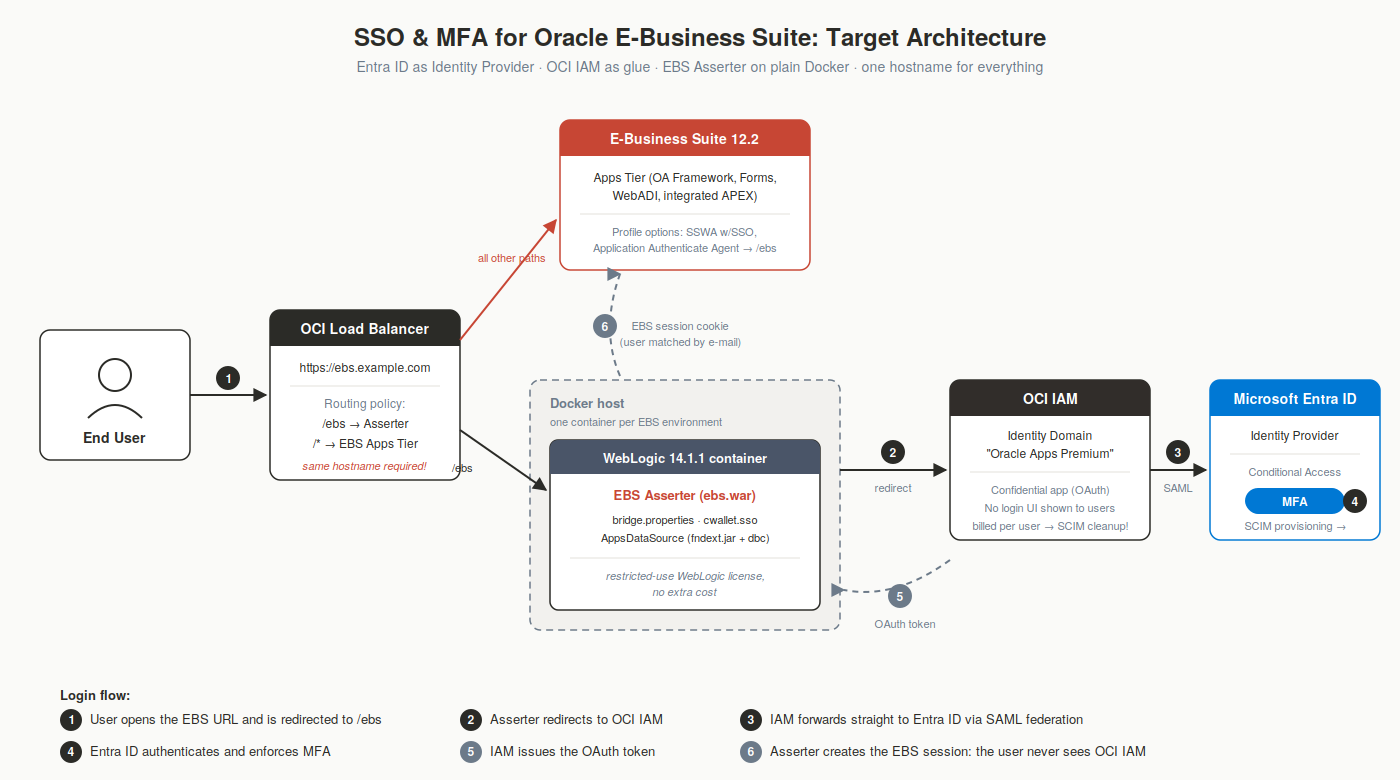
SSO for E-Business Suite with EBS Asserter; IAM Identity Domains and Microsoft Entra ID

The login flow end-to-end:

  1. The user opens the well-known EBS URL. The profile option Application Authenticate Agent redirects unauthenticated users to /ebs (the Asserter), served under the same hostname through an OCI Load Balancer routing policy.

  2. The Asserter redirects to the OCI IAM Identity Domain.

  3. The Identity Domain doesn't ask for credentials itself. It is federated with Entra ID via SAML and forwards the user straight to Microsoft.

  4. Entra ID authenticates the user and enforces MFA through the existing Conditional Access policies.

  5. The SAML response flows back, OCI IAM issues the OAuth token, the Asserter matches the user against EBS (by e-mail address) and creates the EBS session.

The key point, and my favorite property of this architecture: the end user never sees OCI IAM. From their perspective, they click the EBS link, get the familiar Microsoft login (usually already satisfied by their Windows session), approve the MFA prompt if asked, and land on the EBS homepage. OCI IAM is purely the glue in the middle; MFA policy lives in exactly one place: Entra ID.

The Operational Model: One Docker Container per Environment

The Oracle documentation describes deploying the Asserter to a dedicated WebLogic Server installation with managed servers per EBS environment. We took a different route, one that readers of my SOA Suite 14.1.2 on Docker series will recognize:

Each EBS environment gets its own WebLogic container, started from the official weblogic_cpu:14.1.1.0-generic-jdk8-ol9 image from the Oracle Container Registry, orchestrated with nothing more than a docker-compose.yml per environment. No installation footprint, no dedicated VM per environment, no shared domain to coordinate patching on.

Why this works so well for the Asserter specifically:

  • The Asserter is stateless: all configuration lives in the WAR file, a wallet, and a JDBC descriptor. A container is disposable and rebuildable in minutes.

  • Environment isolation for free: DEV, QAT and PROD each run their own container with their own ports, secrets and configuration, on a single small Docker host.

  • Cloning becomes scriptable: when an EBS environment is cloned, the Asserter must be reconfigured (the APPL_SERVER_ID changes!). With containers, this is a fully automated docker compose cycle triggered from the EBS Cloud Manager. Part 3 covers this in detail; in my view it is the most valuable piece of the whole setup.

  • CPU patching = pulling a newer image tag and restarting.

A note on sizing: the Asserter is genuinely lightweight. A single modest VM comfortably hosts the containers for all environments. This is not a component that needs its own infrastructure project.

What's Next

In Part 2 we'll get hands-on: preparing E-Business Suite (the EBS_ASSERTER user, the DBC file, and why your users' e-mail addresses need to be correct and unique), setting up the IAM Identity Domain with the confidential application (including current console screenshots, since the official documentation predates the current IAM console), and bringing up the WebLogic container with a fully worked docker-compose.yml and bridge.properties.

Questions about SSO/MFA for E-Business Suite?

Feel free to reach out: At Broadpin we've taken this from PoC to production.