Because we utilized the Autonomous Recovery Service, the database restore is largely driven by the OCI Console, but there are specific parameters required to ensure EBS connectivity later.
The Workflow:
We initiated a "Restore to new DB System" from our locked backup window.
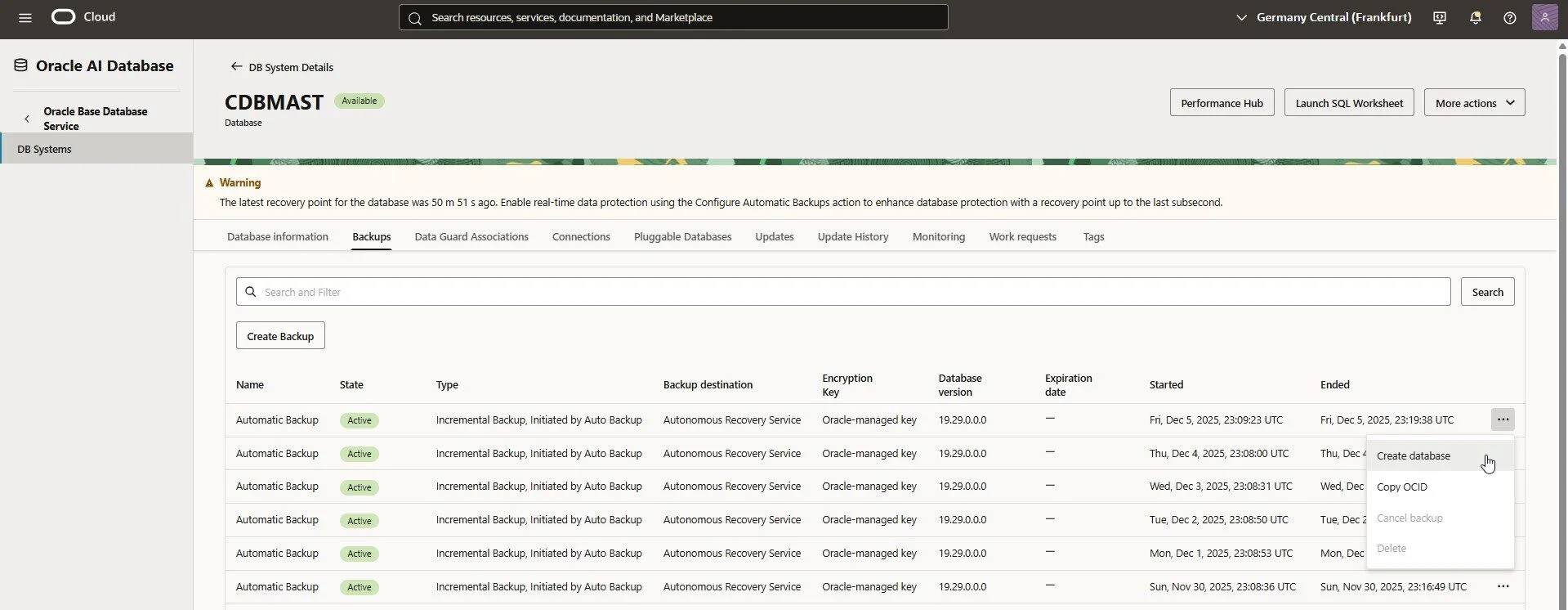
"Create database" from a backup
Critical Configuration Details:
Grid Infrastructure: We explicitly selected "Oracle Grid Infrastructure" (required for our architecture), rather than the Logical Volume Manager.
Hostname & DB Name: To minimize reconfiguration effort, we matched the source hostname (master240125db) and Database Name (CDBMAST).
Shape: We selected an appropriate shape (Standard E5) to balance cost vs. restore speed.
Result: The 4-OCPU system restored fully in approx. 1.75 hours. While this ran, we moved immediately to the Application Tier.
Phase 2: The App Tier Restore (The Manual Lift)
Since we used our "Workaround Strategy" (tarballed backups in locked Object Storage) for the App Tier, this required a manual, validatable procedure.
1. OS Preparation
We spun up a vanilla Oracle Linux 8 compute instance in our recovery subnet and prepped the prerequisites:
Installed python36-oci-cli (to talk to our bucket).
Installed EBS pre-reqs (oracle-ebs-server-R12-preinstall).
The "Gotcha": We applied a specific fix for libXm.so to ensure Oracle Forms would launch correctly later:
cd /usr/lib && sudo ln -s libXm.so.4.0.4 libXm.so.2
2. The Retrieval
This was the moment of truth. Could we read from the locked bucket? We used Instance Principals for authentication to stream and extract the backup on the fly:
oci os object list --auth instance_principal --bucket-name Master_Immutable_Backup | grep tgz
# choose the latest:
oci os object get --bucket-name Master_Immutable_Backup --auth instance_principal --name bkp_fullMAST_master240125app01_20251119_012240.tgz --file - | sudo tar -zxp
Result: The restore of the /u01 volume completed in roughly 25 minutes – finishing well before the database was ready.
In this case we restored the (very simple, single-node) instance to local Block Storage. In real scenarios you'll probably want to restore to File Storage Service (FSS) and have multiple apps-tier nodes.
Phase 3: The Handshake (Reconfiguration)
Once both tiers were online, we had to stitch them together. Since this was a restore to a new (test-restore-) subnet, networking and configuration files needed updates. We put a manual entry to /etc/hosts so that the apps- and db-tier can talk to each other; if you restore to a subnet with the same domain than the source (in real desaster) this is not necessary though.
Since restoring the database provides a "new" Oracle Home (not a backup of the source), we have to eventually apply individual patches and especially recreate the appsutil directory. Then we run the specific EBS-tool txkPostPDBCreationTasks.pl to register the restored PDB with the system.
##for proper utl_file-setup:
sudo mkdir -p /u01/app/oracle/product/19.0.0.0/temp/MAST
sudo chown -R oracle:oinstall /u01/app/oracle/product/19.0.0.0/temp/

cd $ORACLE_HOME
unzip /tmp/appsutil.zip # copy from /u01/install/APPS/fs?/inst/apps/MAST_mastebsapp01/admin/out/appsutil.zip on the Apps-Tier

cd $ORACLE_HOME/appsutil
cp -r $ORACLE_HOME/jdk/jre .
cp $ORACLE_HOME/jlib/orai18n.jar $ORACLE_HOME/appsutil/jre/lib/ext

cd $ORACLE_HOME/appsutil
. ./txkSetCfgCDB.env dboraclehome=/u01/app/oracle/product/19.0.0.0/dbhome_1
export ORACLE_SID=CDBMAST
export TNS_ADMIN=/u01/app/oracle/product/19.0.0.0/dbhome_1/network/admin

sqlplus system
# must work without errors and also no warnings (password to expire)

perl $ORACLE_HOME/appsutil/bin/txkPostPDBCreationTasks.pl \
-dboraclehome=$ORACLE_HOME \
-outdir=/u01/app/oracle/product/19.0.0.0/dbhome_1/appsutil/log \
-cdbname=$ORACLE_SID \
-dbuniquename=$ORACLE_UNQNAME \
-cdbsid=$ORACLE_SID \
-pdbsid=MAST \
-appsuser=apps \
-israc=no \
-virtualhostname=master240125db.restoretestsubn.ebsnetwork.oraclevcn.com \
-dbport=1521 \
-generateutlfiledir=yes \
-servicetype=dbsystem

##Important Post-Steps:
sqlplus / as sysdba
alter pluggable database all save state;

srvctl stop database -d $ORACLE_UNQNAME
cd $ORACLE_HOME/bin ; chopt enable olap
cd $ORACLE_HOME/bin ; chopt enable partitioning

srvctl stop listener
srvctl start listener
srvctl start database -d $ORACLE_UNQNAME
After updating the /etc/hosts file to point to the new DB IP, we ran the standard EBS configuration tools. We also verified the utl_file_dir paths were correctly registered in the database context.
. setenv_run.sh
sqlplus apps
# should work properly
adautocfg.sh
# should have no errors
. setenv_patch.sh
adautocfg.sh
# should only complain about EBS_LOGON Trigger
# In a new session (make sure that ssh to localhost works with the default priv-key):
. setenv_run.sh
./myadop.sh -validate
A modern EBS environment isn't just Forms and Reports. We also reconfigured:
Phase 4: Startup, Validation & Cleanup
With those preparations in place we can finally startup the E-Business Suite apps-tier.
adstrtal.sh
In order to access the environment we created a restoretest-loadbalancer pointing to the Apps- and ORDS Backends in the restore-subnet.
We pointed our local browser hosts file to the Restore Load Balancer (eventually locally overriding the usual hostname with the restore-loadbalancer-IP) and ran the victory lap:
Login: Successful via HTTPS.
Forms: Opened successfully (thanks to the library fix!).
Concurrent Managers: Active and processing.
ECC: Works.
APEX: Accessible.
Once validated, we terminated the Compute instances and the Database System to keep the infrastructure cost of this entire validation drill negligible.

:quality(80))