
Broadpin

Private Access to Oracle Fusion Cloud Applications - Part 1: Which lock actually fits for you?

This blog post was written by Johannes Michler (Chief Technology Officer (CTO) @ Broadpin & Oracle Ace Director).

Oracle Fusion Cloud Applications - ERP, HCM, SCM - are SaaS. You get a URL, you get a login page, and by default that login page is reachable from every internet cafe on the planet. For a lot of organizations that is exactly the point. For others - regulated industries, works council agreements, sovereign cloud deployments, or simply a CISO who has had a bad year - it is not acceptable. They want the same rule that applies to their on-premises ERP: if you are not on the corporate network, you do not even see the door.

That is doable, and this short series describes how we built it in a recent Broadpin project, for a customer running Fusion in the #Oracle EU Sovereign Cloud.

It is also worth writing up now rather than two years ago, because the answer has changed. Fusion Applications and OCI have grown together considerably over the last few months: the environment's network configuration now lives in the same console as the VCN, the DRG and the service gateway, and ingress access control rules, internet cache and the rest are properties you set yourself. The whole setup below is self-service. You do not need a service request for any of it - which was not true for the equivalent setups a while ago, and which is the single biggest practical difference if you last looked at this topic some time back.

But before any of that: "make Fusion private" is not one decision. It is four, at four different layers, and they solve different problems. Quite a few projects reach straight for a VPN tunnel when what they actually needed was one of the other three. So part 1 is about choosing the right lock. Part 2 builds the tunnel for those who genuinely need it.

  • Part 1 (this one): the four layers, what each one buys you, and when the private path is worth its complexity

  • Part 2: the concrete build - transit VCN, service gateway, DRG, Site-to-Site VPN, both route tables, and the Fusion configuration

  • Part 3: making sure traffic from Oracle Integration to on-premises SFTP servers and to Fusion stays private
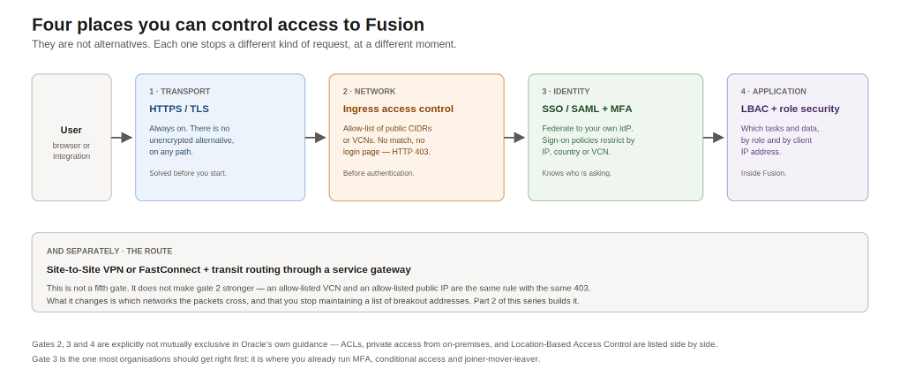
Four different controls, four different moments. Only one of them is a network problem.
Layer 1: the transport. Already done.

Traffic to Fusion is HTTPS. Always. It is TLS-encrypted whether it travels over your IPSec tunnel or over hotel WiFi, and Oracle does not offer an unencrypted alternative.

This is worth saying out loud because "the data goes over the public internet" is often the sentence that starts these projects, and it quietly implies that the data is exposed. It is not. Confidentiality and integrity on the wire were solved before you walked in. What is still open is who is allowed to reach the endpoint at all, and which networks the packets traverse on the way. Those are real questions - but they are different questions, and being precise about it saves you from designing the wrong thing.

Layer 2: the identity. The one most people should fix first.

If your users still sign in to Fusion with a local username and password, network controls are the wrong place to start. Fusion authenticates through an OCI IAM identity domain, and that identity domain can federate via SAML 2.0 to whatever you already run - Microsoft Entra ID, Okta, Ping, ADFS. You should do this, and not only for convenience:

  • Your existing MFA applies to Fusion, without configuring MFA twice

  • Joiner-mover-leaver runs in one place; someone who leaves the company loses ERP access when their account is disabled, not when somebody remembers to raise a ticket

  • Password policy, session policy and sign-in risk detection are inherited rather than reinvented

  • You get one audit trail of sign-ins, not two

And - this is the part relevant to our topic - location-based rules live here too, and they are considerably more expressive than a network allow-list.

In an OCI IAM identity domain you define a network perimeter and attach it to a sign-on policy. A network perimeter can be a set of IP addresses, IP ranges or CIDR blocks, a set of countries, or a set of VCNs. The sign-on policy can then allow, deny, or require MFA depending on whether the request matches. "Anyone outside Germany and Austria must do a step-up MFA" is a policy, not a project. If you federate to Entra ID instead, you build the same thing with named locations and conditional access - the point is that you already own that machinery.

Fusion adds a third variant on top: Location-Based Access Control, configured inside the running application, which restricts access to tasks and data by role and client IP address. That one is granular in a way no firewall can be - "payroll administrators may only run this task from an office address" is an LBAC statement, not a network statement.

Oracle's own planning documentation lists ACLs, private access from on-premises networks, and Location-Based Access Control side by side, with the explicit note that these use cases are not mutually exclusive. That framing is correct and worth adopting.

In general using IAM with Oracle Fusion is a relatively lightweight process and even more simple compared to doing this with OnPrem ERP Systems. I described a procedure for E-Business suite here.

Some concepts from over there are for sure also relevant in an Oracle Fusion context.

Layer 3: the network. The allow-list.

Every Fusion environment has ingress access control rules. If the list is empty, everything is allowed. As soon as it contains one entry, everything else is denied - a request from a non-matching source never sees a login page, it gets an HTTP 403.

Entries come in two notation types. Public CIDR blocks, or a Virtual Cloud Network in your own tenancy.

Here is the honest bit, and it is the reason this article exists. Those two notation types are the same mechanism with the same enforcement and the same 403. Pointing the rule at a VCN instead of at a public CIDR does not make the control cryptographically stronger, does not add an authentication step, and does not turn a public endpoint into a private one. It is a configuration entry either way.

So if your users all leave the corporate network through one or two known internet breakout addresses, allow-list exactly those. Ten minutes of work. No VCN, no DRG, no tunnel, no route tables, nothing new to operate. For a large number of organisations this is the right answer and I would recommend starting there.

Layer 4: the route. What the private path actually changes.

Which brings us to the tunnel. If the allow-list is the same mechanism either way, why build the thing at all?

Because the private path is not a stronger version of layer 3. It is a different property: the packets stop traversing the public internet, and you stop maintaining a list of addresses. Those are the two things you are buying, and they are worth real money in some situations and nothing at all in others.

It earns its complexity when:

  • Your breakout addresses change, or there are a lot of them, across many sites and countries, and the allow-list becomes a maintenance item that someone will eventually forget

  • Split-tunnel VPN clients, mobile devices and home offices reach the internet directly, so there is no stable source address to allow-list in the first place

  • Integrations and middleware running in OCI would otherwise leave to the internet and come back in - which is the subject of part 3

  • Policy or contract says traffic to the SaaS environment must not transit the public internet at all. This is common in sovereign cloud and public sector contexts, and it is a routing requirement, not a security-strength argument. Someone has to be able to answer it with a network diagram

  • You want one enforced path rather than a policy that depends on every laptop being configured correctly

It does not earn its complexity if the honest driver is "public endpoints feel unsafe". Layer 2 is where that concern is better spent.

The target architecture

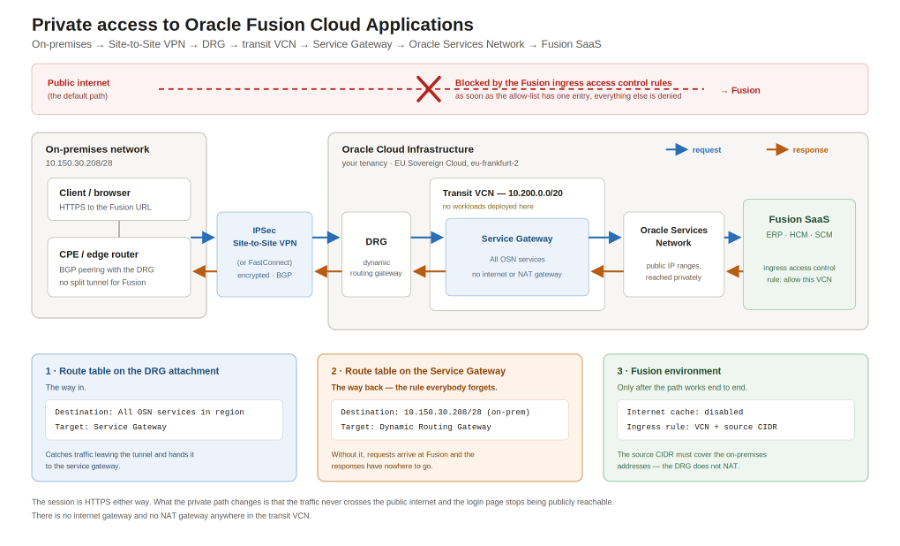
For those who do need it, this is what part 2 builds:

On-premises client
  -> IPSec Site-to-Site VPN (or FastConnect)
  -> Dynamic Routing Gateway (DRG)
  -> transit VCN
  -> Service Gateway
  -> Oracle Services Network
  -> Fusion

The complete path, and the three configuration objects that make it work.

Note what is not in that list: no internet gateway, no NAT gateway, no public IP anywhere on your side. Fusion does not live in your VCN and never will, so this is not peering - it is transit routing into the Oracle Services Network via a service gateway, a documented OCI pattern:

https://docs.oracle.com/en-us/iaas/Content/Network/Tasks/transitroutingoracleservices.htm

Two details from that diagram are worth flagging now, because they are where the time goes.

The first is the return route on the service gateway. Requests reach Fusion happily without it; responses have nowhere to go, and the failure looks exactly like a firewall dropping your traffic somewhere deep inside Oracle. Part 2 tells that story properly.

The second is that Fusion's internet cache has to be switched off before any of this works. Oracle's documentation is explicit: content is delivered through a CDN, and you must disable content acceleration if you are configuring the environment for private access over VPN or FastConnect. That is not folklore - it is stated in the environment management guide and in the network setup guide:

https://docs.oracle.com/en-us/iaas/Content/fusion-applications/network-setup.htm

One warning worth carrying into part 2: if internet cache is disabled and you afterwards configure a vanity domain, you cannot re-enable internet cache yourself - that needs a service request. Decide the order deliberately.

So, which lock?

  • Everyone: federate Fusion to your identity provider and put your MFA and conditional access in front of it. This is layer 2 and it is where most of the actual risk lives.

  • Most: add an ingress access control rule for your internet breakout addresses. Ten minutes.

  • Some: add Location-Based Access Control inside Fusion for the handful of roles that deserve it.

  • A few, for the reasons listed above: build the private path. That is part 2.

Choose deliberately rather than by default - and if you build the tunnel, build it because of the route, not because you think it upgrades the lock.

Part 2 follows: the transit VCN, the service gateway, the DRG and the VPN, both route tables, the Fusion configuration, and the one route rule that costs everybody their first attempt.