Broadpin

Private Access to Oracle Fusion Cloud Applications - Part 2: Building the Path for Client Access

This blog post was written by Johannes Michler (Chief Technology Officer (CTO) @ Broadpin & Oracle Ace Director).

Part 1 argued that "make Fusion private" is four decisions at four layers, and that most organizations should spend their effort on federating Fusion to their identity provider rather than on a tunnel. If you have read it and concluded that you genuinely need the private path - your breakout addresses are unmanageable, your clients have no stable source address, or policy says the traffic must not cross the public internet - this is the build.

What follows is the architecture we implemented in a recent Broadpin project, for a customer running Fusion in the Oracle EU Sovereign Cloud: the exact route rules involved, and the one mistake that is very easy to make and remarkably hard to see. Every step below is self-service in the console - no service request is needed anywhere in this setup, which is a comparatively recent state of affairs.

Spoiler for the impatient: the return route on the service gateway.
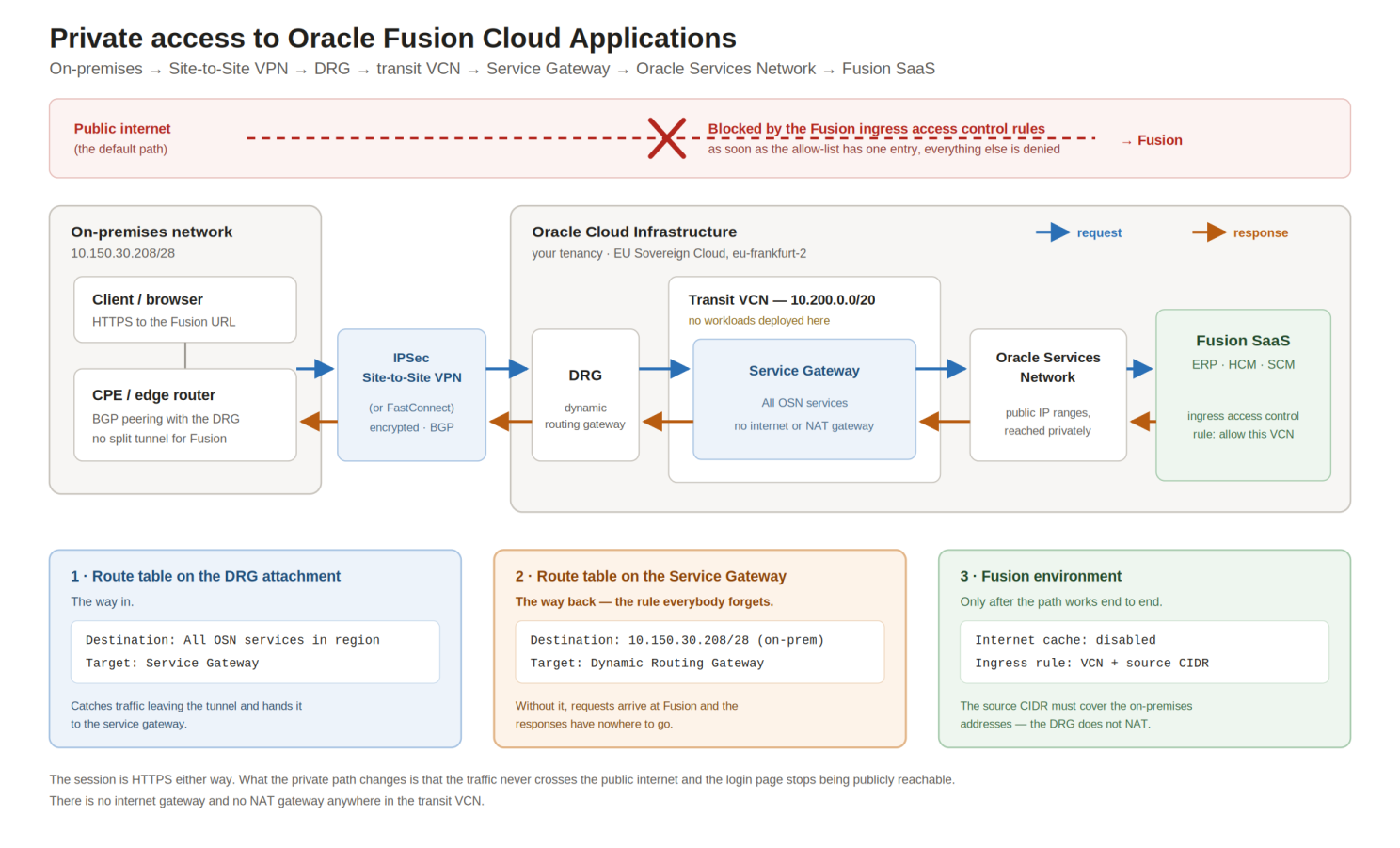
The complete path, and the three configuration objects that make it work.

The path:

On-premises client
  -> IPSec Site-to-Site VPN (or FastConnect)
  -> Dynamic Routing Gateway (DRG)
  -> transit VCN
  -> Service Gateway
  -> Oracle Services Network
  -> Fusion

Fusion does not live in your VCN and never will, so this is not peering. It is transit routing into the Oracle Services Network (OSN) through a service gateway, which is a documented OCI pattern:

https://docs.oracle.com/en-us/iaas/Content/Network/Tasks/transitroutingoracleservices.htm

Note what is not in that list: no internet gateway, no NAT gateway, no public IP anywhere on your side. The transit VCN is genuinely a transit VCN. Oracle explicitly recommends not running workloads in it, and that advice is worth following - the moment you put VMs in there, VCN local routing starts competing with your transit rules and troubleshooting becomes miserable.

None of this replaces single sign-on. Everything below controls where a request may come from; it says nothing about who is making it. Federate the environment to your identity provider first, as described in part 1, and treat this as the second layer rather than the only one.

Private Access to Oracle Fusion Cloud Applications - Part 1: Which lock actually fits for you?

Step 1: the transit VCN and the service gateway

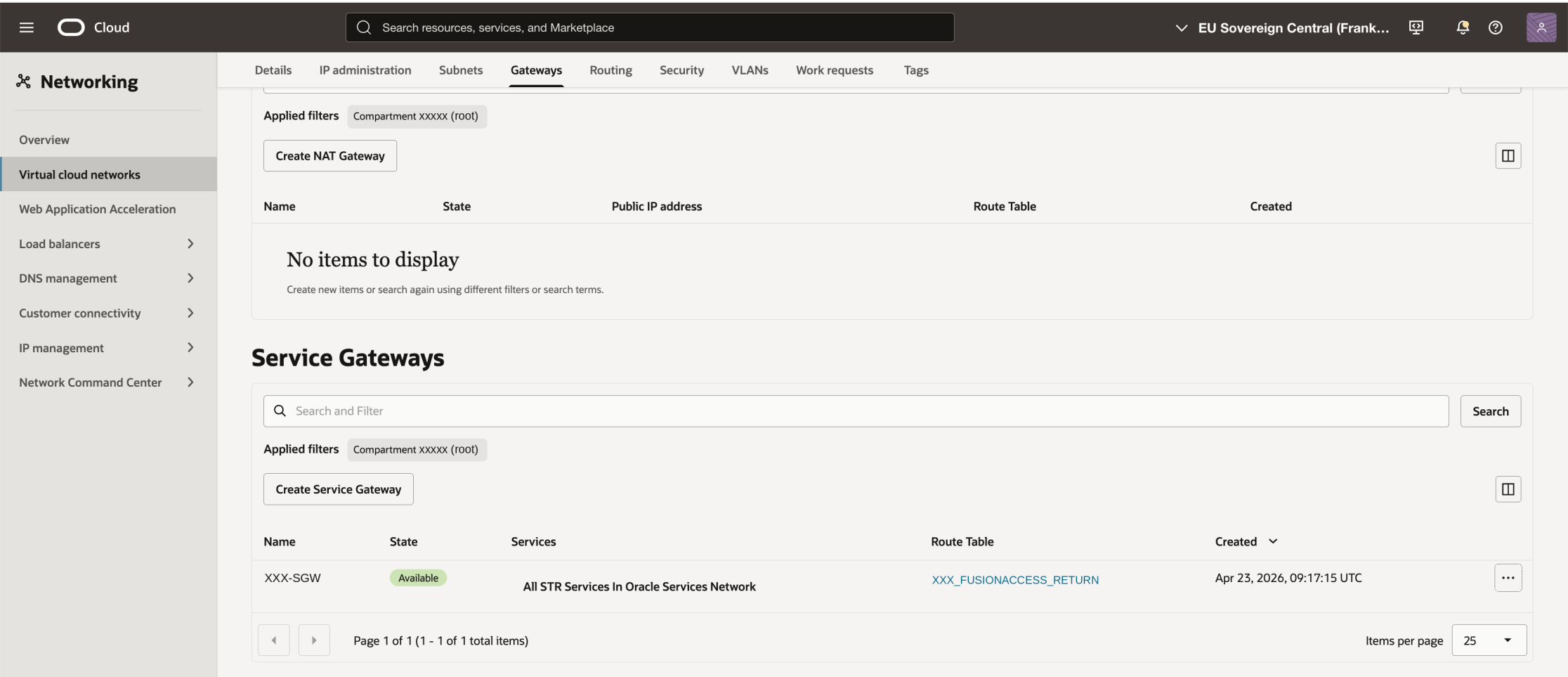
Create a VCN - ours is a /20 out of 10.200.0.0 - and attach a service gateway to it. Choose the "All <region> Services In Oracle Services Network" label, not the object-storage-only one. Fusion is reached through the broader OSN range.

The service gateway in the transit VCN, with its own route table assigned.

At this point the service gateway exists but is inert. It has no route table of its own yet, which is exactly the trap we will walk into in a minute.

Step 2: DRG, VPN and BGP

Attach a DRG to the VCN and terminate the Site-to-Site VPN on it. We use BGP rather than static routes, which pays off immediately because the tunnel tabs in the console become your first diagnostic tool.

Before anything else, though: configure both tunnels. OCI provisions two tunnels for every IPSec connection, to two different headends, and it is entirely possible to bring one of them up, see traffic flow, and declare victory. Do not. The redundancy question changes character the moment you finish this project. Until now, if the tunnel dropped, users simply reached Fusion over the internet and nobody noticed. Once the ingress allow-list is in place, that fallback is gone by design - a dead tunnel means nobody in the company can log in to ERP. A single-tunnel setup turns an ordinary Oracle-side maintenance window into a company-wide outage. Configure the second tunnel on the CPE, verify the BGP session is actually established on both, and test a failover deliberately rather than discovering the behavior during a maintenance window. If the environment matters enough to justify this architecture, it probably also justifies two physical paths or a FastConnect with a VPN as backup.

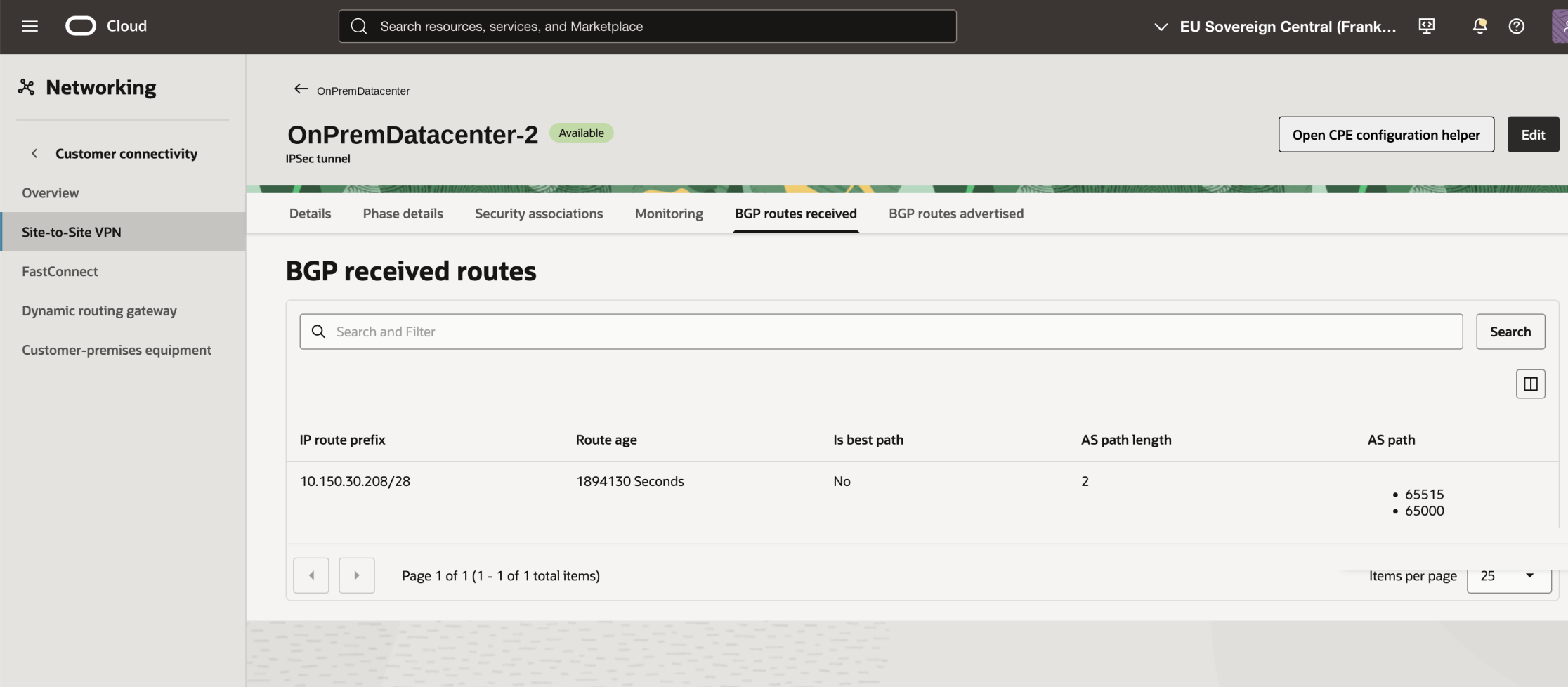
"BGP routes received" shows what your CPE advertises into OCI. In our case exactly one prefix, the on-premises subnet the clients live in:

BGP routes received: the single on-premises prefix advertised by the CPE.

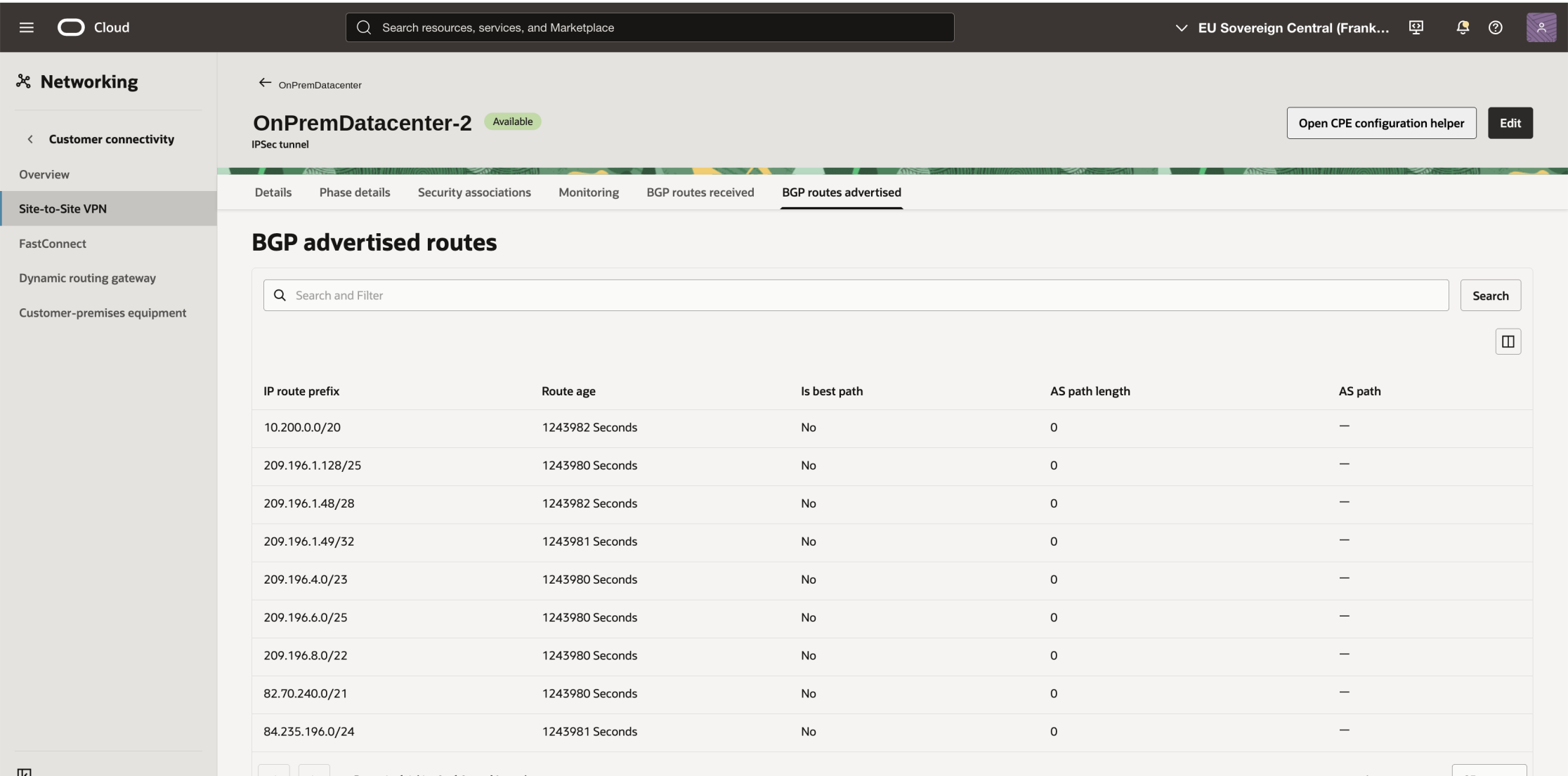
"BGP routes advertised" shows what OCI pushes back to your CPE. This is the tab people forget exists, and it is the more interesting one. You will see your VCN CIDR - and, once transit routing to OSN is switched on, a set of Oracle public ranges:

BGP routes advertised: the VCN CIDR plus the Oracle Services Network ranges OCI pushes to the CPE.

Those Oracle ranges are the reason your on-premises router sends Fusion traffic into the tunnel at all. Fusion's hostname resolves to public IP addresses; nothing about "private access" changes that. What changes is that those public addresses are now reachable over your private path, because OCI advertised them to you. If you run the VPN with static routing instead of BGP, you have to configure those ranges on the CPE by hand - and keep them current.

Step 3: route table on the DRG attachment (the way in)

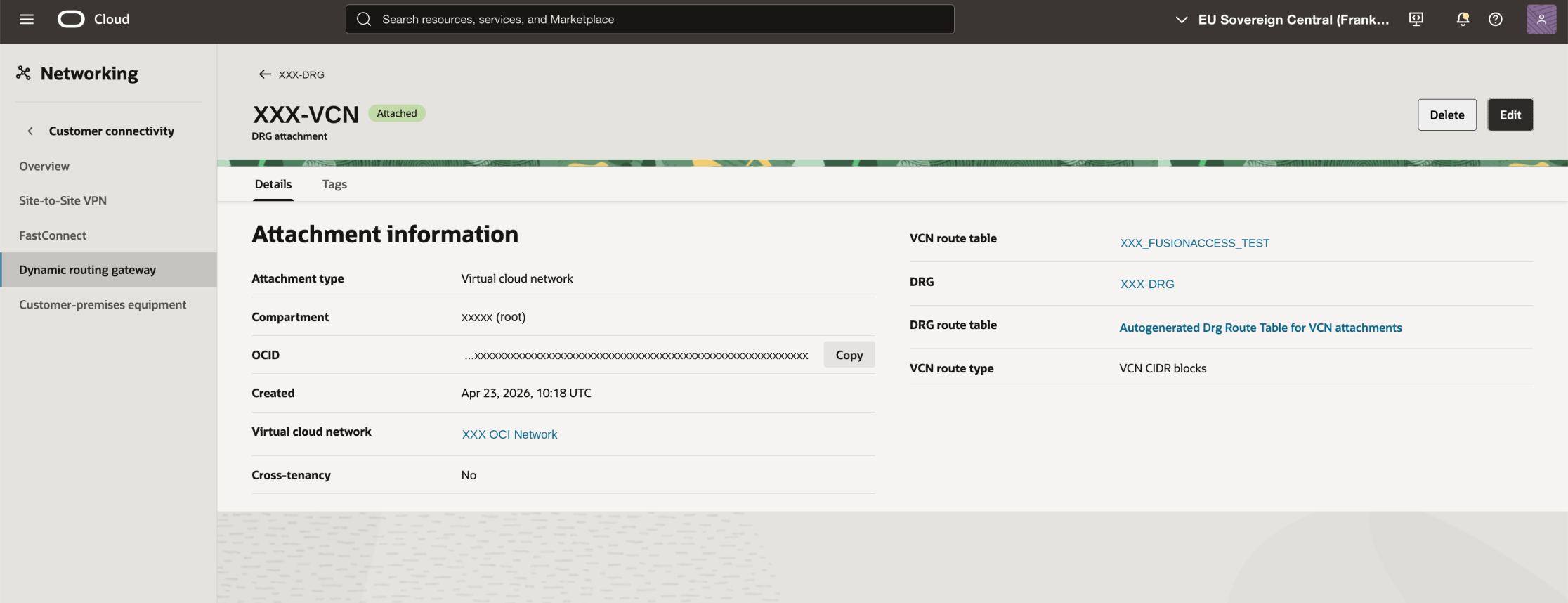
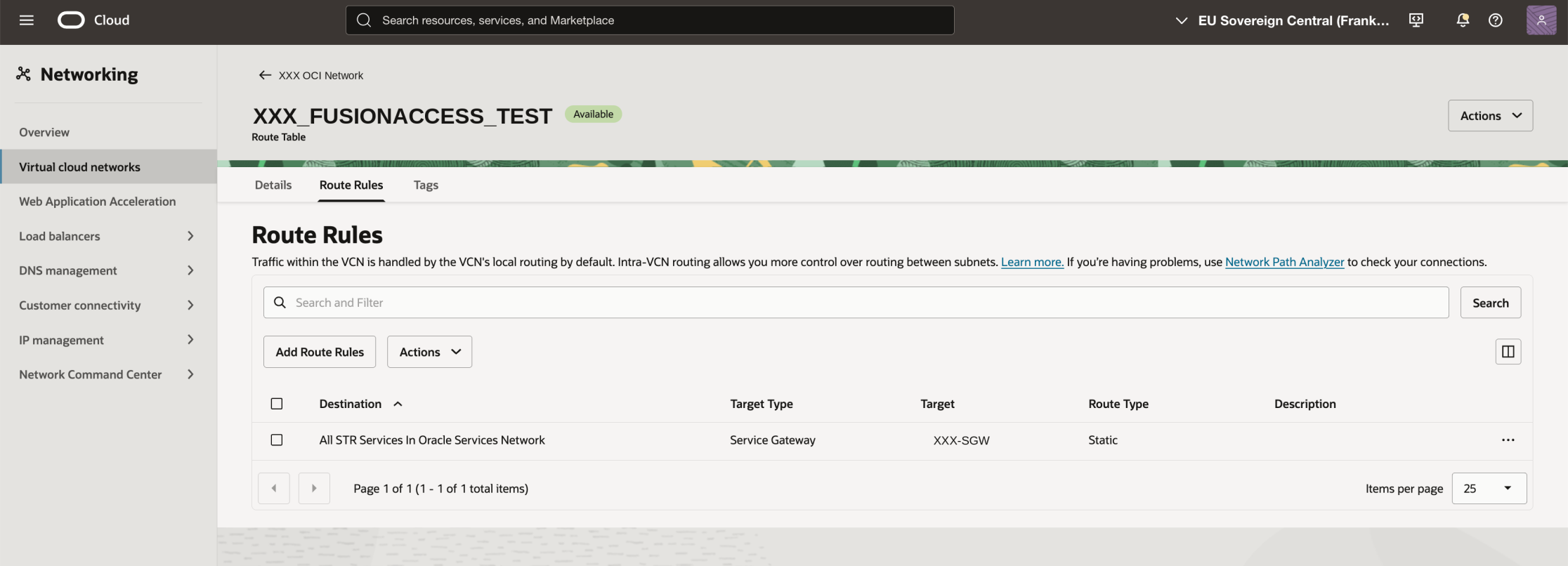
The VCN's DRG attachment gets a dedicated route table. One rule:

Destination: All <region> Services In Oracle Services Network
Target:      Service Gateway

The DRG attachment of the transit VCN and the route table assigned to it.

The way in: all OSN services routed to the service gateway.

This is the rule that catches traffic coming out of the tunnel and hands it to the service gateway. Note that a DRG attachment route table is restricted: it can only target a service gateway, a private IP, or a local peering gateway. Which is fine, because that is all we want.

Step 4: route table on the service gateway (the way back)

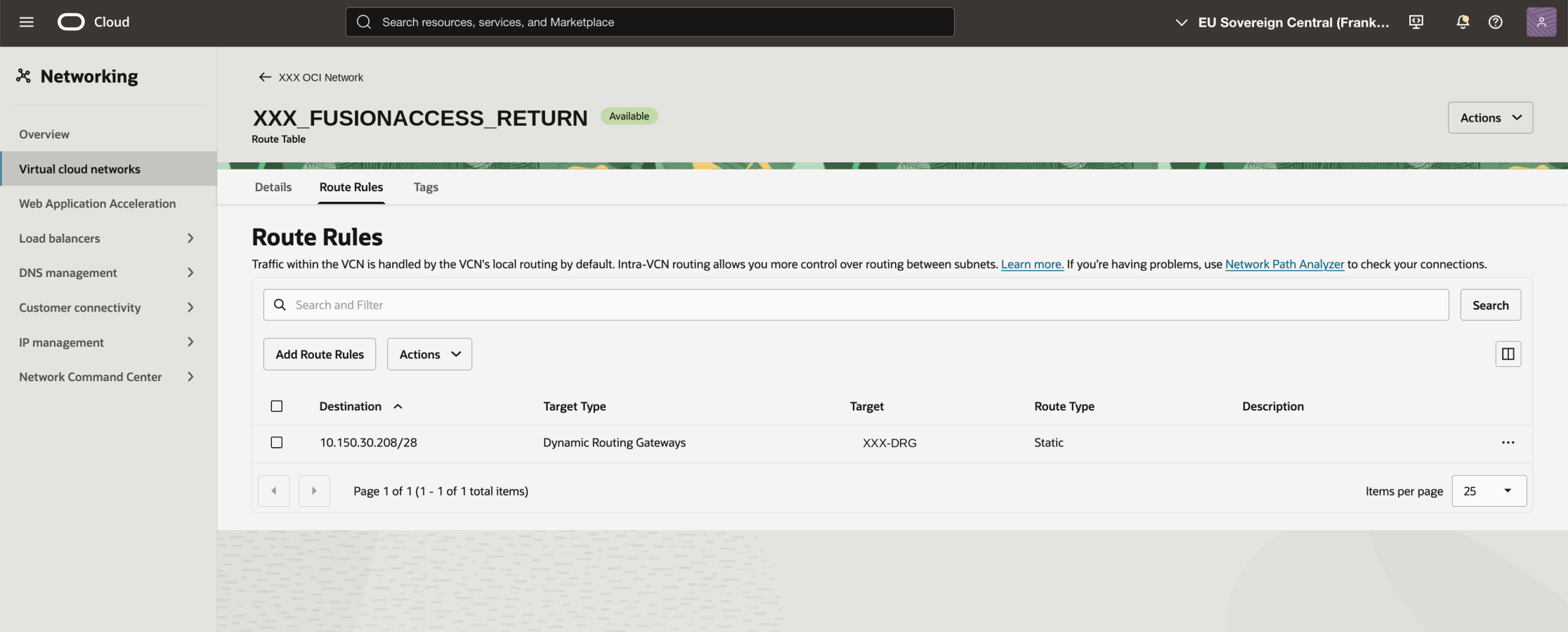
And here is the part everybody misses. The service gateway needs its own route table, with a rule pointing back at your on-premises network:

Destination: 10.150.30.208/28   (the on-prem CIDR you receive via BGP)
Target:      Dynamic Routing Gateway

The way back: the on-premises CIDR routed to the DRG. This is the rule everybody forgets.

Without this rule, request packets reach Fusion perfectly happily. Responses have nowhere to go. From the outside it looks exactly like a firewall dropping your traffic somewhere deep inside Oracle.

The debugging story

This is roughly what we realized when setting this up:

From within an OCI subnet using the same route table, wget to the Fusion URL through the service gateway works. From on-premises I see traffic going into the S2S tunnel, but no answers coming back. There is no way for me to trace traffic on the OCI side - can you look at the tunnel on your end?

Every sentence in there is true, and the conclusion drawn from it was wrong.

The test from inside the VCN felt like a rigorous proof: same route table, same service gateway, same target URL, works. What it actually proved was only that the outbound half of the path was correct (still this is a very easy and important test to do first!). A VM inside the VCN gets its return traffic delivered by VCN local routing - the service gateway does not need a route table entry to reach a subnet in its own VCN. On-premises addresses are a different story. They are not local. They are reachable only through the DRG, and the service gateway will not send anything there unless a route rule says so.

So the successful in-VCN test was the very thing that kept us looking in the wrong place. The classic asymmetric-routing shape: half the path validated, the other half never exercised.

Two practical lessons out of that:

  • A test from inside the transit VCN is not a test of the on-premises path. If your source IP is not an on-premises IP, you have not tested anything about the return route.

  • You are blind on the OCI side. There is no tcpdump on a service gateway. Flow logs do not cover this. Which means you troubleshoot by reasoning about route tables, not by looking at packets - so read both route tables carefully. If that doesn't help the only thing you can do is: Open a SR and Oracle can give you details on the traffic flowing through the tunnel.

Step 5: the Fusion side

Only once the private path demonstrably works from an on-premises client should you touch the Fusion environment. Do it in the other order and you will lock yourself out of the environment you are trying to configure.

And check the calendar before you plan the change window, because this is the constraint nobody accounts for. Changing the network configuration is an environment lifecycle operation, and you cannot start one while maintenance is scheduled or already under way on that environment. With a quarterly update approaching, or a monthly maintenance sitting in the schedule, the change is simply not available to you - it is not a permissions problem and there is nothing to troubleshoot, you have to wait. Fusion environments are in maintenance more often than people assume, so look at the maintenance schedule for the environment before you promise anyone a date, and build the go-live plan around the gaps rather than around your own project plan. This bites hardest at exactly the wrong moment: production, the week of a quarterly update, with a security deadline in the room.

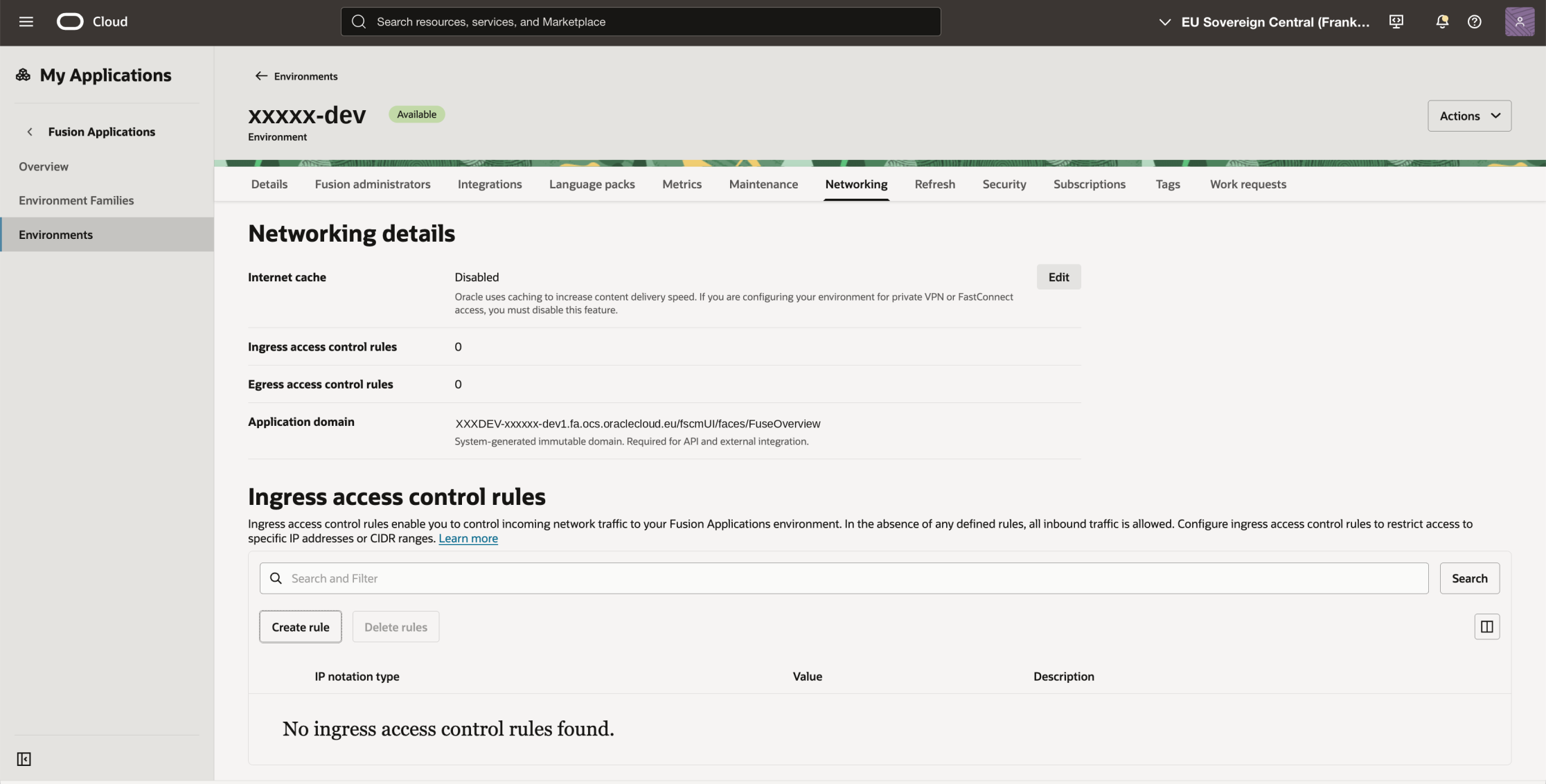
First, disable the internet cache. This is not optional and it is not folklore - Oracle documents it plainly. Fusion delivers content through a CDN, and the environment management guide states that you must disable content acceleration if you are configuring the environment for private access over VPN or FastConnect:

https://docs.oracle.com/en-us/iaas/Content/fusion-applications/manage-environment.htm

The network setup guide puts it as "Fusion Applications uses Content Delivery Network (CDN)-based caching to deliver content faster to users. You must disable content acceleration to prevent caching", and walks through the same toggle on the Networking tab:

https://docs.oracle.com/en-us/iaas/Content/fusion-applications/network-setup.htm

The environment goes into an updating state for a while. Two things to know before you flip it: this affects delivery performance for any user who is not on the private path, and if you disable internet cache and afterwards configure a vanity domain, you cannot re-enable internet cache yourself - that requires a service request. Decide the order deliberately.

The Fusion environment with internet cache disabled and no ingress rules yet - still open to the world.

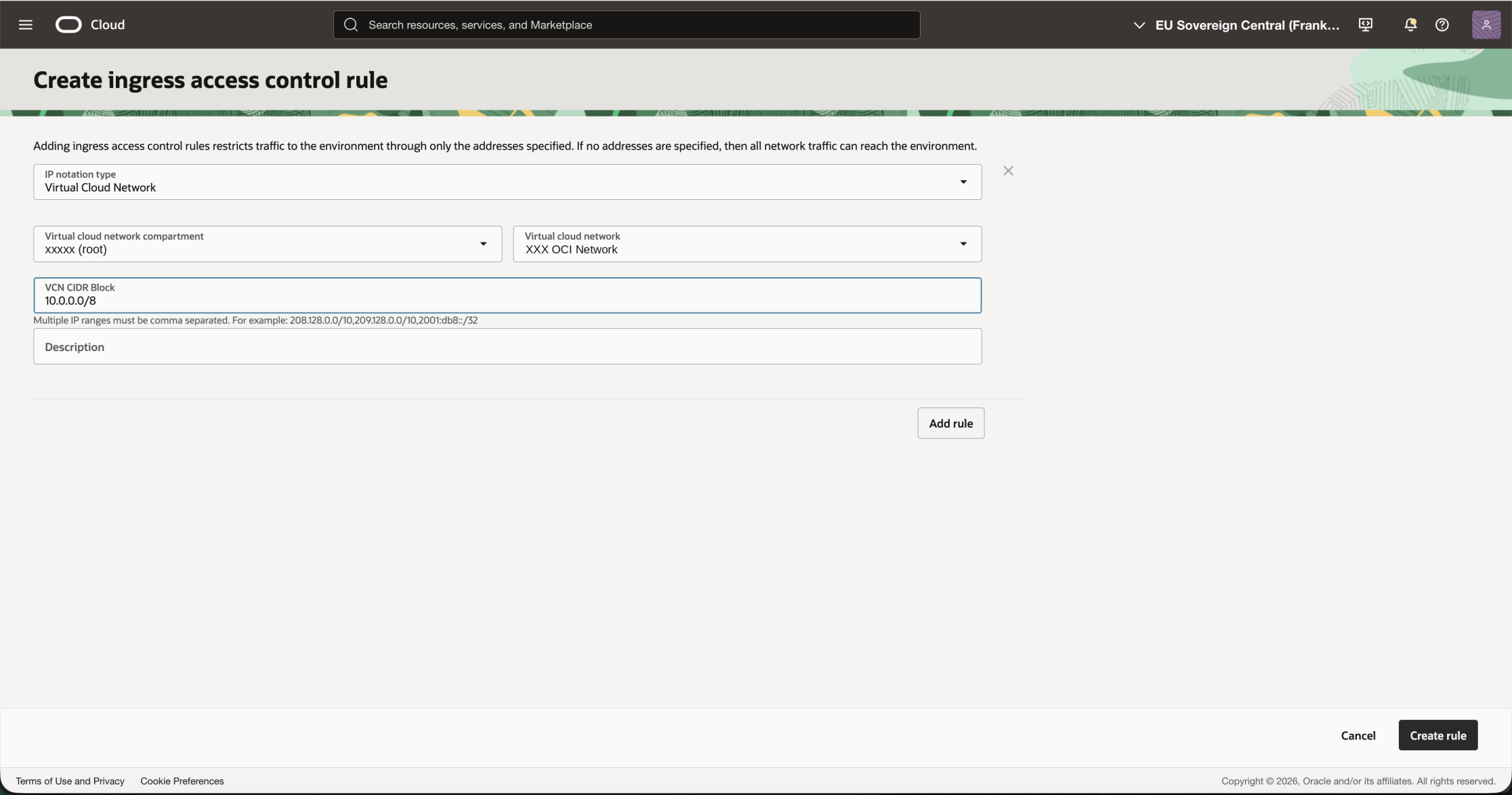
Then create the ingress access control rule with IP notation type "Virtual Cloud Network", pick the compartment and the transit VCN, and specify the CIDR block that is allowed to reach the environment through it.

The ingress access control rule: notation type Virtual Cloud Network, plus the source CIDR that is allowed through it.

Watch that last field. It is labelled "VCN CIDR Block", which invites you to type the CIDR of the VCN. But the traffic arriving at Fusion still carries the original on-premises source address - the DRG does not NAT. In our setup the clients sit in 10.150.30.208/28 while the VCN is 10.200.0.0/20, so a rule restricted to the VCN's own CIDR would have matched nothing. We entered 10.0.0.0/8 to cover the on-premises ranges arriving through the transit VCN. Size that field to the sources you actually expect, not to the VCN.

From this moment on, everything that is not on that list gets an HTTP 403 - including you, from your home office, unless you are on the VPN.

Step 6: the break-glass rule

This used to be a bullet at the end of my checklist. It has been promoted, because the day it matters is the day nothing else works.

Think about what you have just built. The only way into the environment is a tunnel. If that tunnel is down, if BGP flaps, if somebody renumbers the on-premises subnet and forgets the route rule, or if a firewall change quietly drops ESP - then nobody can reach Fusion. Not the users and not the integrations.

Two practical points to derive from this:

  • Do this in a non-production environment first. Ingress rules are per environment, and a test environment is a much better place to discover that you sized a CIDR wrong.

  • Make sure you know how to undo or widen the access rules in case the tunnel and the backup tunnel break.

Checklist before you raise an SR

  • Is there a route table associated with the service gateway itself, with a rule for the on-premises CIDR targeting the DRG? This is the number one omission.

  • Does that CIDR match what you actually see under "BGP routes received" on the tunnel? A /24 in the route rule and a /28 on the wire is a silent mismatch.

  • Does the DRG attachment route table point OSN at the service gateway - and is it really assigned to the attachment, not just created?

  • Are you testing from a genuine on-premises source address? A jump host in the transit VCN proves nothing about the return path.

  • Did you pick the full OSN service label rather than object storage only?

  • Is internet cache disabled on the Fusion environment?

  • Does the ingress rule's CIDR cover your real client source addresses?

  • Are you testing with curl or a browser? ICMP will not get you an answer from Fusion; a ping test proves nothing here.

  • Are both IPSec tunnels up, with BGP established on each, and has a failover been tested on purpose rather than in production?

  • Is the break-glass rule in place, documented, and known to more than one person?

  • Have you checked the environment's maintenance schedule? No network change is possible while maintenance is scheduled or running.

What you end up with

Fusion ERP and HCM that answer only to clients arriving out of your own network, over an encrypted tunnel, on a path that never touches the public internet - while remaining a plain, unmodified SaaS environment. No reverse proxy to operate, no VDI detour, no exception in the firewall policy that somebody has to justify at every audit.

The mechanics are all documented. The one thing the documentation states plainly but the failure mode hides very effectively is that a service gateway needs to be told how to get back to you.

Setup shown here: Oracle EU Sovereign Cloud, eu-frankfurt-2. The same pattern works unchanged in the regular commercial realm, and with FastConnect instead of an IPSec tunnel.

Part 3 will cover the other direction: keeping traffic from Oracle Integration to on-premises SFTP servers and to Fusion itself encrypted and off the public internet.