Broadpin

SSO and MFA for Oracle E-Business Suite with Entra ID, OCI IAM and the EBS Asserter, Part 2: Setting Up the Asserter

This blog post was written by Johannes Michler (Chief Technology Officer (CTO) @ Broadpin & Oracle Ace Director).

In Part 1 I described the target architecture: Microsoft Entra ID as the identity provider, an OCI IAM Identity Domain as the glue, and the EBS Asserter running in a plain WebLogic Docker container. This second post walks through the actual setup: preparing E-Business Suite, registering the confidential application in the IAM domain, and bringing up the containerized Asserter with a fully worked configuration.

The series:

  1. Architecture and Motivation

  2. Setting Up the Asserter (this post)

  3. Going Live and Surviving the Clone: Load Balancer, Enforcing SSO and Automation

  4. Entra ID Federation, SCIM Provisioning and Beyond EBS

We follow the official configuration guide in principle, but deviate in two ways: the deployment target is a Docker container instead of a classic WebLogic installation, and some console screens have changed since the documentation was written. I'll include current screenshots where the docs are outdated.

SSO and MFA for Oracle E-Business Suite with Entra ID, OCI IAM and the EBS Asserter, Part 1: Architecture and Motivation

Step 1: Prepare E-Business Suite

The EBS_ASSERTER application user

The Asserter needs a dedicated EBS application user that is allowed to connect through the APPS schema without knowing the APPS password (more on why that matters in the datasource section below). Following the Oracle guide:

  1. As SYSADMIN, open the User Management responsibility and register a new user account named EBS_ASSERTER (all other fields empty).

  2. Assign the role with code UMX|APPS_SCHEMA_CONNECT.

  3. Set an initial password, sign in once as EBS_ASSERTER, and change it to the final password. Store it in your secret vault; you will need it for the WebLogic datasource.

E-mail addresses: correct AND unique

The Asserter matches the authenticated identity to an EBS user by e-mail address. This has two consequences that are easy to underestimate and should be verified before any rollout:

  • Correct: a user whose EBS e-mail address doesn't match their Entra ID address simply cannot log in anymore once SSO is enforced. Think of people marrying for example.

  • Unique: if two active EBS users share the same e-mail address, the mapping is ambiguous and the login fails. This might happen with a second (service ) user that has not yet been replaced with proxy sign on.

A quick pre-flight check for duplicates:

SELECT UPPER(email_address), COUNT(*)
  FROM fnd_user
 WHERE email_address IS NOT NULL
   AND (end_date IS NULL OR end_date > SYSDATE)
 GROUP BY UPPER(email_address)
HAVING COUNT(*) > 1;

Don't forget the special accounts: SYSADMIN needs a (real, unique) e-mail address as well if anyone is supposed to log in with it after the switch. Oracle documents the details in Create an Oracle E-Business Suite System Administrator.

The DBC file

The Asserter authenticates against EBS using a DBC file created for a dedicated (virtual) node name. On the apps tier, with the run filesystem environment sourced:

java oracle.apps.fnd.security.AdminDesktop apps/<apps_pwd> CREATE \
  NODE_NAME=ebsasserter.example.com DBC=$FND_SECURE/$TWO_TASK.dbc

This produces a file like DEV_EBSASSERTER.EXAMPLE.COM.dbc. One pitfall: the generated file may reference the database host of the environment the template was cloned from. Open it and verify the JDBC connect string points to the correct DB host before copying it to the Docker host. In Part 3 we'll automate exactly this step (including a sed one-liner) because the file must be regenerated after every clone.

Also note the APPL_SERVER_ID line in the DBC file. Remember it exists; it will star in its own drama in Part 3.

Step 2: The IAM Identity Domain and the Confidential Application

Create the domain

In the OCI console, create a new Identity Domain of type Oracle Apps Premium. As discussed in Part 1, this tier is sufficient for the Asserter and is billed per user and month.

Register the confidential application

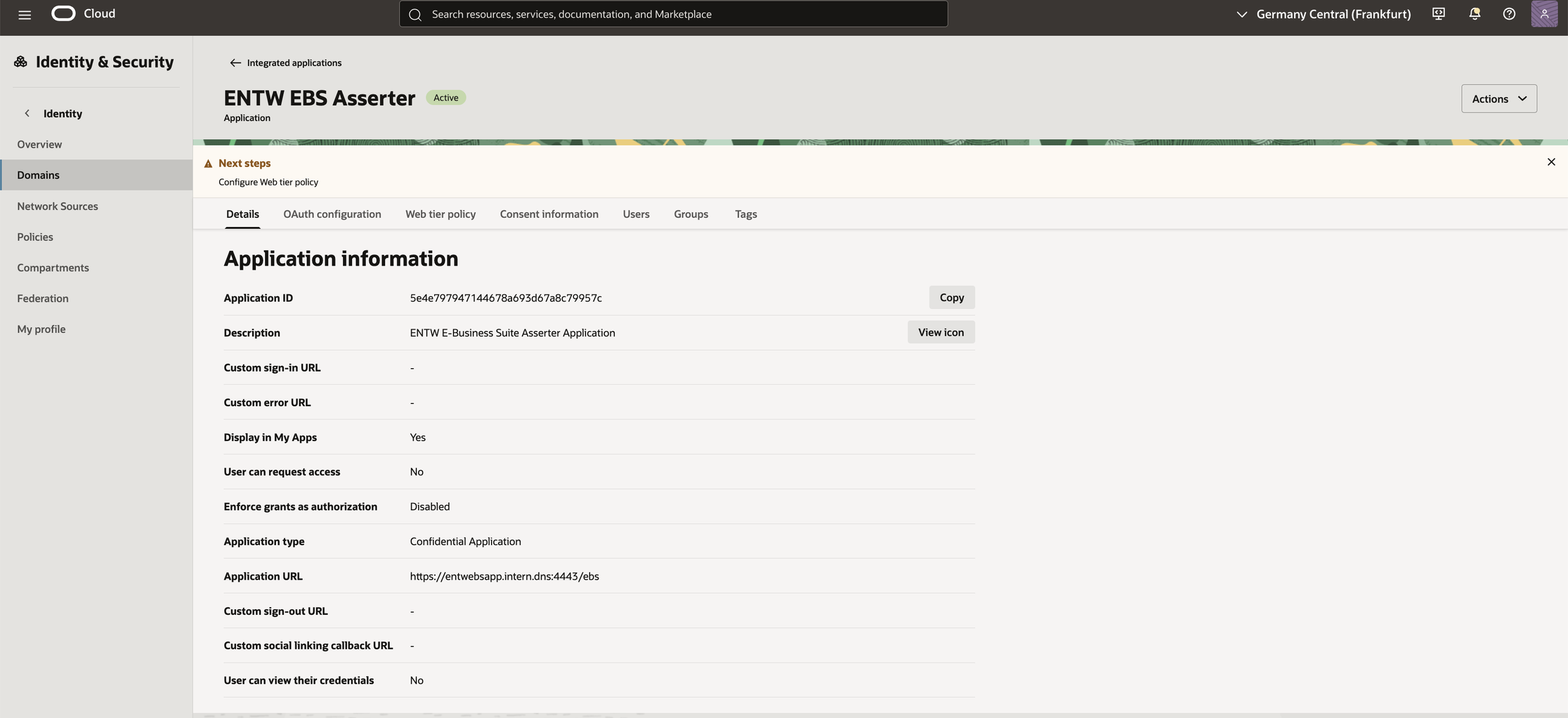
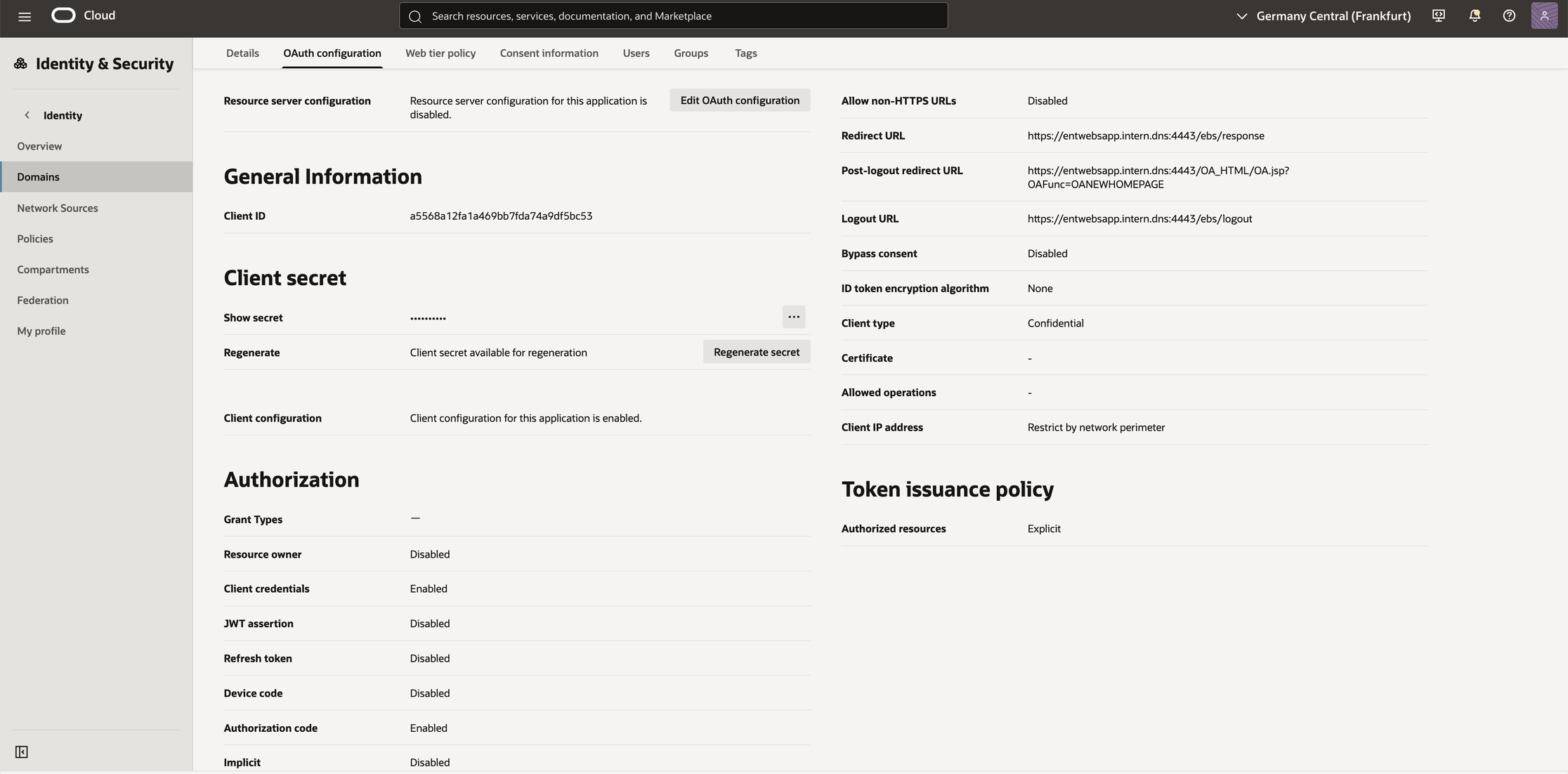
Under Integrated applications, add a new Confidential Application for the Asserter. The official walkthrough still describes the old IDCS console; the screens below show what the current OCI IAM console actually looks like.

The Details tab of the confidential application. Application type must be Confidential Application.

The OAuth configuration tab.

The values you need to note down for the next step:

  • Client ID and Client Secret from the OAuth configuration

  • The domain base URL, i.e. https://idcs-<guid>.identity.oraclecloud.com

  • The redirect URL must point to the Asserter under the same hostname as EBS itself, e.g. https://ebs.example.com:4443/ebs/response

Create the wallet

The Asserter reads the OAuth client credentials from an Oracle wallet. The wallet generator ships with the Asserter download; run it once inside the container (or anywhere with a JDK) and answer the prompts with client ID, client secret and domain URL:

java -jar idcs-wallet-<version>.jar

This produces the cwallet.sso referenced in bridge.properties below.

Step 3: The WebLogic Container

Per the Asserter documentation, the supported platform is WebLogic 14.1.1 with JDK 8. Conveniently, Oracle publishes exactly that as a container image, including quarterly CPU refreshes:

docker login container-registry.oracle.com
docker pull container-registry.oracle.com/middleware/weblogic_cpu:14.1.1.0-generic-jdk8-ol9

The complete docker-compose.yml for one environment (here: DEV):

services:
  ebs_asserter_dev:
    image: container-registry.oracle.com/middleware/weblogic_cpu:14.1.1.0-generic-jdk8-ol9
    container_name: ebs_asserter_dev
    ports:
      - "7501:7501"
      - "9502:9502"
    volumes:
      - /root/ebs_asserter/domain.properties:/u01/oracle/properties/domain.properties
      - /root/ebs_asserter/home_oracle_dev:/home/oracle/ebs_asserter
    environment:
      DOMAIN_NAME: asserter_domain
      ADMIN_LISTEN_PORT: 7501
      ADMINISTRATION_PORT: 9502
      PRODUCTION_MODE: dev
      JAVA_OPTIONS: "-Djava.util.logging.config.file=/home/oracle/ebs_asserter/logger.properties"
    restart: unless-stopped

A few notes:

  • domain.properties contains the WebLogic admin credentials; the image creates the domain on first start.

  • The mounted home_oracle_dev directory is the single place where all environment-specific artifacts live: ebs.war, cwallet.sso, the DBC file, the JDBC descriptor and fndext.jar. The container itself stays disposable.

  • Each additional environment is another compose file with different ports and its own home directory, on the same small VM.

  • The image ships a health check; wait for healthy before deploying anything (docker compose up -d --wait does this for you).

Step 4: Configure and Repackage ebs.war

Download the Asserter from the Identity Domain settings, extract bridge.properties, adjust it, and update the WAR in place:

unzip ebs.war WEB-INF/bridge.properties
vi WEB-INF/bridge.properties
zip -u ebs.war WEB-INF/*

The complete bridge.properties we run in production (anonymized):

properties

app.url=https://ebs.example.com:4443/ebs
app.serverid=<APPL_SERVER_ID from the DBC file>
ebs.url.homepage=https://ebs.example.com:4443/OA_HTML/OA.jsp?OAFunc=OANEWHOMEPAGE
ebs.ds.name=visionDS
ebs.user.identifier=email
idcs.user.identifier=email
idcs.iss.url=https://identity.oraclecloud.com
idcs.aud.url=https://idcs-<guid>.identity.oraclecloud.com
post.logout.url=https://ebs.example.com:4443/OA_HTML/OA.jsp?OAFunc=OANEWHOMEPAGE
wallet.path=/home/oracle/ebs_asserter/cwallet.sso
ebs.renew.session=true
whitelist.urls=https://ebs.example.com:4443/OA_HTML/RF.jsp,https://ebs.example.com:4443/OA_HTML/OA.jsp,https://ebs.example.com:4443/OA_HTML/BneApplicationService,https://ebs.example.com:4443/OA_HTML/jsp/fnd/close.jsp

Three properties deserve special attention:

idcs.iss.url is NOT your tenant URL. The issuer URL stays at the generic https://identity.oraclecloud.com, while idcs.aud.url carries your tenant-specific domain URL. Getting these two mixed up produces token validation errors that are unpleasant to debug.

ebs.renew.session=true saves your Forms users. With the default setting we hit a nasty issue during the PoC: once the ICX session expired, Forms users were thrown out entirely and could not simply continue working. After an SR with Oracle, the answer was this (a bit hidden) property. With session renewal enabled, an expired session is transparently renewed via the still-valid SSO session, and the user just keeps working. If you run Forms (and who doesn't), set this to true from day one.

whitelist.urls needs your integration entry points. RF.jsp and OA.jsp cover standard navigation, BneApplicationService is required for WebADI, and close.jsp for clean window handling. If a redirect target isn't whitelisted, the Asserter will refuse it.

Step 5: The Datasource, Without the APPS Password

The Oracle documentation shows a generic JDBC datasource connecting as APPS, with the APPS password stored in WebLogic. That works, but putting the APPS password of a production ERP into a WebLogic domain configuration is nothing I want to defend in a security review.

The better option is Oracle's AppsDataSource (driver class oracle.apps.fnd.ext.jdbc.datasource.AppsDataSource from fndext.jar): it authenticates as the EBS_ASSERTER application user from Step 1 and uses the DBC file to establish the APPS connection. No APPS password anywhere outside EBS.

The JDBC descriptor (visionDS-jdbc.xml), deployed via the autodeploy directory instead of console click paths:

<?xml version='1.0' encoding='UTF-8'?>
<jdbc-data-source xmlns="http://xmlns.oracle.com/weblogic/jdbc-data-source">
  <name>visionDS</name>
  <jdbc-driver-params>
    <url>jdbc:oracle:thin:@ebsdb.example.com:1521:DEV</url>
    <driver-name>oracle.apps.fnd.ext.jdbc.datasource.AppsDataSource</driver-name>
    <properties>
      <property><name>user</name><value>EBS_ASSERTER</value></property>
      <property><name>dbcFile</name><value>/home/oracle/ebs_asserter/DEV_EBSASSERTER.EXAMPLE.COM.dbc</value></property>
    </properties>
    <password-encrypted><!-- password of EBS_ASSERTER --></password-encrypted>
  </jdbc-driver-params>
  <jdbc-connection-pool-params>
    <test-table-name>SQL ISVALID</test-table-name>
  </jdbc-connection-pool-params>
  <jdbc-data-source-params>
    <jndi-name>visionDS</jndi-name>
    <global-transactions-protocol>None</global-transactions-protocol>
  </jdbc-data-source-params>
</jdbc-data-source>

The deployment sequence matters, because fndext.jar must be on the domain classpath before the datasource comes up:

# 1. fndext.jar into the domain lib, then restart

docker exec ebs_asserter_dev cp /home/oracle/ebs_asserter/fndext-2.0.9.jar /u01/oracle/user_projects/domains/asserter_domain/lib
docker restart ebs_asserter_dev

# wait until healthy again, then:
# 2. datasource descriptor via autodeploy

docker exec ebs_asserter_dev cp \
/home/oracle/ebs_asserter/visionDS-jdbc.xml \  /u01/oracle/user_projects/domains/asserter_domain/autodeploy/

# 3. the Asserter itself via autodeploy

docker exec ebs_asserter_dev cp /home/oracle/ebs_asserter/ebs.war \
/u01/oracle/user_projects/domains/asserter_domain/autodeploy/

No WebLogic console involved at any point. This is deliberate: the exact same commands run unattended in the post-clone automation we'll build in Part 3.

Smoke Test

Point a browser directly at the container: https://<docker-host>:7501/ebs. You should see the Asserter landing page ("Asserter for E-Business Suite"), and following the login link should bounce you to the IAM domain (and later, once federation is in place, straight to Microsoft). This exact page title will also serve as the health check pattern for the load balancer backend set.

What's Next

In Part 3 we go live: the OCI Load Balancer configuration that serves the Asserter under the EBS hostname, the profile options that enforce SSO (and how to avoid locking yourself out), and the automation that survives EBS clones, including the scripts that regenerate the DBC file and repair the APPL_SERVER_ID inside the WAR without any manual step.

Questions about SSO/MFA for Oracle E-Business Suite?

Feel free to reach out: At Broadpin we've taken this from PoC to production.

Man in the office sitting in front of a laptop